Change from 'Settings' tab
– Users online
Internet Explorer

Internet Explorer is not supported. Please upgrade to a more modern browser.

Wiki

Player guide · Updated 3 November 2026

Towny Reborn Guide

New here? Start with your first 10 minutes. Already playing? Choose what you want to do or search for an answer.

New player? Start here

Your first 10 minutes

You can explore the other systems later. Start with these four steps.

  1. 01

    Join Towny Reborn

    Java: play.townyreborn.com
    Bedrock: play.townyreborn.com — port

    Then choose Towny Reborn in the hub.

    Java & Bedrock joining help →
  2. 02

    Find a place on Earth

    Open and choose Earth for your permanent home.

    Which world should I use? →
  3. 03

    Save your way back

    Run . Return with .

    Protect your land with Towny →
  4. 04

    Start earning money

    Open and choose a Job that matches what you enjoy.

    Jobs, money & trading →

Keep your home on Earth. Resource worlds reset every day, and a saved home does not protect land.

Choose your next step

All topics

All 26 guides in one place. Open a topic for the short version, then expand the details you need.

Which level am I looking at?

Jobs: your profession and its income/rewards. mcMMO: individual skills and abilities. Reborn Journey: JP, level rewards and optional permanent perks. PyroFishing / PyroMining: their own separate progression and upgrades.

Understand the different levels →
← All topics
Start playing

How to join Towny Reborn

Join with Java or Bedrock Edition, then choose the Towny server in the hub. Bedrock support is still in beta.

The short version

Add Towny Reborn, then enter the Earth survival server from the hub.

  1. Java: add play.townyreborn.com and enable Server Resource Packs.
  2. Bedrock: use the same address and port 25692.
  3. Choose Towny Reborn in the hub. Use Your first 10 minutes when you arrive.

Bedrock support is in beta; some custom models and menus may look different.

Choose what you need

Key facts & screenshots
Java Edition

Add the server

Open Multiplayer

Click Add Server in Minecraft Java Edition.

Enter the address

Set Server Resource Packs to Enabled, then click Done.

Join Towny Reborn

Select the saved server and click Join Server.

The Java resource pack provides our custom models, menus and textures.

Bedrock Edition Beta

Add a custom server

Open the Servers tab

Choose Play → Servers → Add Server in Minecraft Bedrock Edition.

Enter the server details

Name: Towny Reborn
Address:
Port:

Save and join

Save the server, select it and join the network.

These steps apply when your Bedrock client offers Add Server.

!

Bedrock is in beta. Some custom textures, models and menus may look different or still need work. Please report any bugs you find.

After you join

After you join

Choose the Towny server

Use the server selector in the hub to enter the Earth SMP.

Find your place on Earth

Use the Earth portal or to find a location.

Set a home

Use when you find a good spot. Build your permanent base on Earth; resource worlds reset.

Build a home

Towny, claims and outposts

Towny turns the Earth map into player-run settlements. Claims protect 16×16 chunks, residents unlock larger limits, and your town bank pays the daily upkeep.

The short version

Protect land by creating your own town. To join an existing town, ask its mayor for an invite and use .

  1. Check nearby claims with .
  2. Create a town with for $2,000.
  3. Fund its bank with , then use for adjacent land.

Keep four full chunks between different towns. Towns need money for upkeep; claims cost $150 each.

Choose what you need

Key facts & screenshots
Create a town$2,000
Claim one chunk$150
Create an outpost$3,000
Create a nation$15,000
Create and fund your first town

Create and fund your first town

Stand where the town should begin

The chunk you stand in becomes the homeblock. Check the grid with . Leave room for the four-chunk gap between towns.

Create it

Run and confirm the $2,000 charge in chat.

Fund the bank

Use . Claims and upkeep are taken from the town bank, not your personal balance.

Expand one chunk at a time

Stand in wilderness next to your land and use . Each chunk costs $150.

Grow with residents

Invite players with ; they join with .

✓

Town protection defaults: PvP, fire spread, explosions and hostile mobs are disabled in a new town. Mayors can manage permitted flags, plot types and resident permissions.

Leave four full chunks between different towns

Leave four full chunks between different towns

New claims must leave at least four completely free chunks between your town and another town. Each chunk is 16 blocks wide, so four free chunks give a 64-block gap along a straight border. The distance is measured from the nearest claimed land, not from the town spawn or homeblock.

✓
Four free chunks: allowed

Along a straight border, if Town A ends in chunk X=0, chunks X=1, X=2, X=3 and X=4 stay free. Town B can start in chunk X=5, provided no other nearby claim blocks it.

↔
Three free chunks: too close

Touching claims and claims with fewer than four free chunks between different towns are blocked. The buffer is also checked diagonally, so cutting across a corner does not bypass it.

  • The same rule applies when founding a town, adding claims, claiming an outpost or moving a homeblock.
  • Towns in the same nation or allied nations still need the gap.
  • You can expand directly next to your own town's claims, as long as the new claim respects the buffer around other towns.
  • Existing claims stay in place. The rule does not remove land; new claims must follow the buffer even next to older land.

Check nearby claims with before choosing a new border or outpost location.

Plots, residents and trust

Plots, residents and trust

▦
Sell a plot

Stand in a town chunk and use /plot forsale <price>. A resident can stand there and run /plot claim.

♟
Trust carefully

/plot trust add <player> grants access to your personal plot. Only trust people you know.

Town levels and limits

Town levels and limits

Your base claim limit and outpost count grow with active residents. A town may also buy the listed number of bonus claims for $50 each. Daily upkeep is $200 × the level multiplier.

Residents Town level Base claims Buyable bonus Outposts Daily upkeep
1 Settlement 20 +10 0 $200
2 Hamlet 32 +15 1 $400
3 Hamlet 32 +20 1 $600
6 Village 96 +25 1 $600
10 Town 160 +30 2 $800
14 Large Town 224 +35 2 $1,000
20 City 320 +40 3 $1,200
24 Large City 384 +45 3 $1,400
100 Metropolis 448 +100 4 $1,600
↗

Outposts: once your town has an available outpost slot, stand in unclaimed wilderness on Earth, in the Earth Nether or in the Earth End and use /t claim outpost. It costs $3,000 and has no maximum distance from your existing town land. Teleport later with /t outpost <number>.

Organise your town

Organise your town

Mayors can assign these resident roles with . Use to remove a role. Choose the role carefully; it does not grant server staff permissions.

Town roleWhat it allows
builderBuild and break on town-owned land in your own town. Privately owned plots remain protected.
recruiterSend and list town invitations.
treasurerWithdraw from the town bank and view its transaction history.
Visit another town in your nation

Visit another town in your nation

Use to visit a town in your own nation. Same-nation travel costs $0, with a 5-second warmup and 30-second cooldown. The destination does not need to be public for this same-nation access. Allied-nation access is not enabled by this rule.

Town creation, claims, outposts, takeovers and moving a homeblock into the reset resource worlds are blocked. Build permanent settlements on Earth.

Earn & progress

Economy, jobs and player shops

Turn everyday gameplay into progress. Earn money through jobs and events, trade with other players through player shops and the Auction House, and reinvest your profits into your town, equipment and future projects.

The short version

Earn money through a Job and trade items with other players.

  1. Start earning with ; check your balance with .
  2. Open to browse shops. Hold an item: finds sellers; finds buyers.
  3. Use for auctions, or create your own chest shop.

Want to buy an item? Use /qss. Want to sell your held item? Use /qsb. Check the price and stock before trading.

Choose what you need

Key facts & screenshots
$
Check and send money

/balance, /balancetop and /pay <player> <amount>.

⚒
Choose your professions

Open /jobs browse, choose a role, then track progress with /jobs stats.

↔
Trade with players

Sell locally with chest shops or globally through /ah.

Jobs

Jobs

Base active-job limits: Member 1 · Skeleton 2 · Creeper 2 · Blaze 3 · Dragon 3 · Wither 4. Earned Job perks can increase your available slots. See the rank comparison and your permanent feature options in .

Choose from Brewer, Builder, Crafter, Digger, Enchanter, Explorer, Farmer, Fisherman, Hunter, Miner, Weaponsmith and Woodcutter. Matching actions award money, Jobs XP and points; payouts are grouped every five seconds. Leaving a job removes 30% of the old job level.

Browse

Use /jobs browse and inspect what each profession pays for.

Join

Run /jobs join <job> or click a job in the menu.

Progress

Perform the listed actions to earn money, Jobs XP and points. When the pink global booster is active, Jobs XP is doubled.

Job milestones, income bonus & career effects →

Community XP boosters

Community XP boosters

Supporters can activate global XP boosters from the Towny Reborn Store. Every active booster benefits the entire server, including players who join while time is still remaining.

⚒
2× Jobs XP Boost

Doubles Jobs experience earned from normal job actions for everyone. Money payouts and Jobs points keep their normal values.

✦
2× mcMMO XP Boost

Doubles mcMMO skill experience earned from eligible gathering, crafting and combat actions for everyone.

↻

Available for 1, 3 or 6 hours. Additional activations extend the remaining time instead of raising the multiplier above 2×. The live bossbars show the remaining duration and the supporter who activated each boost; supporter names rotate when several players contribute.

Active Jobs and mcMMO XP booster bossbars showing the remaining time and supporter name
Boosted Jobs work XP and faster new mcMMO personal power-level records also help you earn Journey Points, within the same daily caps. Pink tracks the Jobs XP boost; green tracks the mcMMO XP boost. Activations are announced in-game with a toast sound.
Follow booster announcements on Discord.

New and extended global Jobs/mcMMO boosters have announcements in the dedicated booster channel. Each announcement shows the activator, XP multiplier, added duration and remaining boost time. Check the in-game bossbar for the current live timer. Open the Towny Reborn Discord ↗

Chest shops: sell and buy items

Chest shops: sell and buy items

1
Create a chest shop

Hold the item you want to sell and left-click a chest. Then enter the unit price in chat. Shop creation is free.

2
Use a shop

Left-click to trade and confirm the quantity. Right-click your own shop to edit or remove it.

3
Understand the tax

A flat 5% transaction tax is charged to the interacting buyer or seller. Changing a shop price costs $50.

4
Advertise it

/shops create <name> creates a public shop warp for $1,000. Browse all shops with /shops.

Find an item across player shops

Find an item across player shops

Looking for something to buy, or a shop that will buy your items? These three commands help you find the right player shop.

Browse the market

Open the shop browser to explore player shops. Search for an item, filter the listings and sort by price to compare offers.

You do not need to hold an item for this command.

Find items to buy

Hold the item in your selected hotbar slot, then run this command. It finds shops selling that item to you.

Example: hold a diamond to compare the shops where you can buy diamonds.

Find buyers for your items

Hold the item in your selected hotbar slot, then run this command. It finds shops buying that item from you.

Example: hold a diamond to see which shops will pay you for your diamonds.

Select a listing to check the shop owner, price per item and available stock or space. Selling shops need stock; buying shops need room for your items. Check the trade direction before choosing a shop.

Stock and available space refresh in open shop menus. Shop signs also update when hoppers or droppers move items.

Player shop warps: make your shop easy to find

Player shop warps: make your shop easy to find

A chest shop trades items. A shop warp is a public teleport destination in . One warp can lead to a shop area containing many chest shops.

Create the destination

Stand at a safe arrival point on Earth and use . Confirm the $1,000 creation fee. Names use letters, underscores or hyphens, with no spaces and up to 16 characters.

Make the entry clear

Use to change its name, icon and description. The settings menu also controls access and player lists.

Visit or move it

Choose an entry in or use . Stay still during the five-second teleport countdown. To move your own arrival point, stand at the new location and use .

Base public warp limits: Member 1 · Skeleton 1 · Creeper 2 · Blaze 2 · Dragon 3 · Wither 3. These are separate from the number of chest shops you can own.

Player shop limits and permanent bonuses
RankBase shopsWith Store +30With first perk + Store +30
Member205080
Skeleton5080110
Creeper100130160
Blaze150180210
Dragon200230260
Wither240270300

The first permanent shop feature in adds 30 permanent slots to your rank’s base limit. The one-time +30 Player Shop Add-on from the Store adds another 30 and can be purchased once per account.

Later shop perks unlock minimum total limits of 100, 150, 200 and 240; they do not add those amounts on top. The Store add-on stacks with your effective limit. The overall maximum is 300 shops.

Examples: Member 20 → first perk 50 → Store add-on 80. Wither 240 → first perk 270 → Store add-on 300. A fully earned shop path without a paid rank reaches 240, or 270 with the Store add-on.

Permanent shop bonuses stay when a monthly rank expires. Use to see your current limit.

Auction House: trade across the server

Auction House: trade across the server

Find an item

Open or search with . Hover over a listing to check the item, quantity, seller, price and remaining time.

Confirm a purchase

Left-click the listing, check the confirmation screen and choose the green confirm area. The displayed price is for the listed quantity, not automatically for one item.

List your own items

Hold the item and use . The minimum listing price is $10. For example, /ah sell 200 64 lists 64 held items for $200 in total. A 5% tax applies when the listing sells.

Listings expire after 48 hours. Use to manage your items and reclaim expired listings within 14 days after expiry. shows your trade history.

Auction displays at Spawn

The displays show live listings, quantities and prices. Right-click a displayed listing to start buying, or use /ah.

Jobs in-game screenshots
Earn & progress

Job milestones & career effects

Keep building your profession: claim one-time JP, earn more from your Job and choose a personal effect.

The short version

Keeping a Job and levelling it up unlocks extra rewards.

  1. Check your Jobs and levels with .
  2. Open to claim reached milestones.
  3. At qualifying levels, use the same menu to toggle your Job's optional effect.

Job levels belong to that profession. They are separate from mcMMO, Pyro levels and your Journey level.

Choose what you need

Key facts & screenshots
Open milestones & effects/progression jobs
One-time JP per Job3,600 JP
Income bonus from Job 75+5%
Work XP earns daily Journey Points

Work XP earns daily Journey Points

Earn 1 JP per 10 eligible work XP, up to 300 JP per UTC day across all your Jobs combined. That is 3,000 work XP for the full allowance. Progress between Job levels counts, so you can stay with an established Job instead of chasing early level-ups in another profession.

Only genuine work counts. Joining a Job, losing XP or an administrative XP grant does not create work JP. XP boosters help you reach the same daily allowance faster; they do not raise the cap.

Claim your one-time Job milestones

Claim your one-time Job milestones

Open , choose an active Job, then click a reached milestone or the claim-all button. These are Jobs levels, not Journey levels. Existing qualifying Job levels count.

Job levelOne-time JP
25100 JP
50200 JP
75300 JP
100500 JP
1501,000 JP
2001,500 JP

3,600 JP per Job across all six milestones. These rewards are outside the normal daily activity limits. Each player can claim each Job milestone once; leaving, rejoining, relogging or restarting does not reset claimed rewards.

Additional command unlocks from your active Job

Your active Job also unlocks these commands at the listed levels. They are separate from one-time JP claims and career-effect toggles.

Job & levelCommandUse
Crafter / Enchanter · 25Look up a crafting recipe.
Woodcutter · 50Wear a supported held item as a hat.
Miner / Farmer · 75Compact supported resources.
Hunter / Brewer · 100Extinguish yourself.
More income at Job level 75

More income at Job level 75

At level 75, earn 5% more money from that Job. The bonus works with money boosters and applies to the qualifying Job’s income, not every Job or your XP. An XP booster remains an XP booster.

Optional career effects at Job level 100

Optional career effects at Job level 100

In , select your Job and toggle its effect. Effects start disabled. Once enabled, the effect remains available while that Job is active and meets the required level. No beacon is needed.

Active JobEffect at level 100At level 200
Miner / DiggerHaste IHaste II
FarmerSaturation I pulse every 30 secondsSame
WoodcutterFire Resistance ISame
FishermanConduit Power ISame
Hunter / ExplorerSpeed ISpeed II
BuilderJump Boost IJump Boost II
WeaponsmithStrength ISame
BrewerRegeneration ISame
EnchanterResistance ISame
CrafterInvisibility ISame

Only Haste, Speed and Jump Boost upgrade to level II at 200. Other effects retain their level-100 strength. Stronger existing effects are protected when a career effect refreshes.

↗

Job milestones, career effects and the income bonus give you reasons to keep developing a profession. Your Journey level remains a separate shared progression path.

Turn on your career effect

Use your active Job, not a beacon

  1. Check your profession and its level with .
  2. Open and select the qualifying active Job.
  3. Enable its optional career effect. Effects start disabled and require Job level 100.

Farmer's Saturation is a short pulse every 30 seconds, so it does not remain visible like a permanent potion or beacon icon. It is useful when your hunger needs restoring; a full hunger bar can make the pulse easy to miss.

Fisherman provides Conduit Power. Job effects remain separate from XP boosters, mcMMO skills and Journey levels. Leaving the Job or falling below the requirement removes eligibility.

Earn & progress

Quests & objectives

Pick tasks, track their objectives and earn their listed rewards. Reborn Journey has its own separate path.

The short version

Pick a task you enjoy and earn the reward shown in its tooltip.

  1. Open and choose a category.
  2. Hover over a quest to read its target and reward; left-click to start it.
  3. Complete the objective outside Spawn. You can keep up to six quests active.

Completed quests also earn Journey Points. You do not need to do every kind of quest.

Choose what you need

Start a quest

Start a quest

Use or click the Quests NPC at Spawn. Pick a category, hover over a quest to see its target and reward, then left-click to start it. You can keep up to six quests active.

Started quests track automatically. Use shift-left-click to change tracking or right-click to cancel. Finish the objective to earn the reward shown in its tooltip.

Quest categories & Pyro objectives

1,892 configured quests, including 237 Pyro objectives

The latest expansion adds 162 PyroFishing quests and 75 PyroMining quests. Fishing objectives cover species, rarity mastery and collections; mining objectives cover discoveries, artifacts, bosses and ore expeditions. These additions are one-time quests with their displayed rewards and normal quest-completion JP.

114 resource quests now count mining or harvesting directly, rather than waiting for item pickups. Telekinesis works with these objectives and the remaining inventory checks, including Goob’s cocoa challenge. Read each tooltip for whether it counts blocks, harvested items or a specific discovery.

!

Quest objectives do not progress at Spawn. Work in other eligible worlds. Creative, Spectator and protected or cancelled actions do not count. Buying or collecting an existing mining item does not replace making the required discovery.

Fishing guide → · Mining guide →

Current objectives and Impossible Staff Quests

Read the current quest tooltip

Phantom-hunting and Phantom Membrane objectives have been removed from the current quest catalogue. Follow the objectives now shown in the menu rather than an older screenshot or checklist.

The five Impossible Staff Quests use their restored custom task counters. Keep the relevant quest active and follow its exact tooltip; existing progress and rewards for the remaining quests are retained.

If an objective does not count, check the quest is active, the world is eligible and the action is not protected or cancelled. Share the quest name and a screenshot with staff if you need help.

Earn & progress

Invite friends & referral rewards

Share a personal code with a genuinely new player and earn a Supporter Crate Key when they redeem it successfully.

The short version

Everyone can create a code; the new player must meet the redemption rules.

  1. Run and share the code yourself.
  2. Your friend uses after at least two hours of total server playtime, within their first seven days.
  3. Check the result with .

Code generation has no account-age or playtime requirement. The new-player rules apply to the player redeeming it.

Choose what you need

Eligibility, one-time codes and rewards

Who can redeem?

  • The invited player must have at least two hours of total server playtime and still be within their first seven days on Towny Reborn.
  • Each player can redeem one invitation in total. Self-referrals and referral loops are blocked.
  • Each code can be redeemed once. After it is used or expires, the inviter can generate another.
  • Failed attempts do not consume the code.

A successful redemption awards the inviter one Supporter Crate Key. If the inviter is offline, the reward waits until they return. Codes are shared manually; the server does not automatically message your friends.

Total server playtime for referral eligibility is separate from the daily active-playtime JP budget.

Earn & progress

Reborn Journey

Build one shared JP total through everyday play. Advance through 116 named levels, claim one-time rewards and unlock optional permanent features.

The short version

Journey Points (JP) come from everyday play and move you along the Reborn Journey level path.

  1. Open to see your current level and next target.
  2. Earn JP from activities you enjoy: Jobs, skills, fishing, quests, active play and discoveries.
  3. Claim reached rewards. Use to browse optional permanent purchases.

Daily caps are maximums, not a daily checklist. A reached level unlocks a perk for purchase; it does not automatically buy it.

Choose what you need

Key facts & screenshots
Open your Journey/progression
Current path116 levels
Daily budget reset00:00 UTC
↗

Your level advances automatically. JP are cumulative and are never spent. You can keep levelling without buying any perk, claiming a reward or purchasing a Store rank. In-game money is only required when you choose to buy a permanent feature.

Open and navigate the Journey

Open and navigate the Journey

Open the main path

Run . and open the same Journey. In , click the Reborn Progression shortcut near the bottom of the category menu.

Inspect a level

Hover over a path tile to read its rank name, required total JP, missing JP, one-time reward and optional perks. Click a reached level to open its rewards and purchases. Future levels can be inspected before you reach them.

Choose your next activity

Hover over the Your progress experience bottle for completed and remaining percentages within your current level. Click it or the guide book to open How to progress: source rates, personal progress and remaining daily budgets. Hover over your player head for live personal stats.

Browse permanent features

Click the Permanent perks ender chest, or run . Click the Skeleton, Creeper, Blaze, Dragon or Wither head to switch pages and preview every feature. The rank heads are buttons, not decoration.

The current path has four pages of 29 levels: 1–29, 30–58, 59–87 and 88–116. Use the arrows to change pages. It is one continuous snake: when a page ends at the bottom, the next starts at the bottom; when it ends at the top, the next starts at the top. The menu opens on the page containing your current level.

Access message? If the server says you do not have access yet, ask staff whether the Journey has been enabled for your account or group. The Quests shortcut does not bypass access requirements. currently aliases the main Journey; use to open the perk pages directly.

What the path colours mean

What the path colours mean

Green · earlier level

You have passed this level. Its unclaimed rewards can still be collected. Green does not mean you have bought every perk attached to it.

Yellow · current level

This is the level you are on now. Continue earning JP to reach the next level. Yellow means current, not next.

Red · future level

You have not reached its required total JP yet. Hover to preview what is ahead.

At the current final level, the whole path is completed and green. Each level gives a new Journey title, with colours gradually changing from pink to lime. Your existing member, staff or Supporter rank remains separate. In TAB the Journey is shown compactly; chat shows the full title. mcMMO remains its own skill system and display.

How to earn Journey Points

How to earn Journey Points

All seven activities add to the same total. JP are not Minecraft XP, money, Quest Points or a spendable currency. Play in Survival or Adventure in an eligible SMP world. Creative, Spectator, AFK/Hub worlds, NPCs and test bots do not earn JP.

ActivityJP per gainDaily source budgetWhat counts
Active playtime
1 active minute
+2 JP240 JP · 120 active minutesStay active by moving, building, interacting or actively fishing. Standing AFK does not earn playtime JP.
mcMMO
1 new personal highest power level
+30 JP300 JP · 10 levelsOnly a new personal highest power level counts. Existing levels establish your starting baseline.
Jobs
10 eligible work XP
+1 JP per 10 XP300 JP · 3,000 XPGenuine work XP from all active Jobs shares one daily cap. Progress between Job levels counts; joins, lost XP and admin grants do not.
Fishing
1 fish caught with a fishing rod
+5 JP150 JP · 30 catchesA successful rod catch counts. Buying fish or collecting fish items does not earn catch JP.
Exploration
1 newly recorded biome
+20 JPNo daily cap · one-timeEach new biome rewards you once per player. Known biomes do not become new at midnight.
Quests
1 successful quest completion
+20 JP160 JP · 8 completionsActual new completions count, including new runs of repeatable quests. Historical completions are not paid again.
Advancements
1 new non-recipe advancement
+30 JPNo daily cap · one-timeEach newly completed non-recipe advancement rewards you once. Existing completions are not imported as new awards.

Your progress can take a moment to update. When exploring, stay in a new biome briefly so your discovery is recorded.

Daily JP limits

Daily JP limits

The five repeatable sources have separate daily caps totalling 1,150 JP, refreshed at 00:00 UTC every day. Biomes and non-recipe advancements are one-time discoveries without daily caps. Job and PyroMining milestones are separate finite bonuses. This is server reset time, not your local midnight. Your total JP, level, purchases and already claimed rewards do not reset. Unused daily budgets do not carry over, and points beyond a full budget are not queued for tomorrow. If Fishing is capped, you can still earn through the other sources.

Beat your previous highest mcMMO power level to earn mcMMO JP. Jobs JP comes from work XP across all your active Jobs. Each biome and non-recipe advancement rewards you once. A new run of a repeatable quest can earn JP again until you reach the daily quest limit. Changing Jobs or rejoining does not reset your daily limits.

Level calculation, step by step

Level calculation, step by step

The first level-up needs 150 JP. Every following step costs 30 JP more: 150, 180, 210, 240 and so on. These are additional JP for that step; the level catalogue shows the cumulative total required.

From Level L to Level L + 1150 + 30 × (L − 1) JPTotal required to reach Level L150 × (L − 1) + 30 × (L − 1) × (L − 2) ÷ 2 JP

Combine activities

10 active minutes + 5 fish catches + 1 new personal highest mcMMO power level gives 20 + 25 + 30 = 75 JP, provided each source has allowance remaining. Finish one quest for another 20 JP: 95 JP in total. Starting from zero, that leaves 55 JP to Level 2.

Read your percentage

With 250 total JP, you are Level 2. Level 2 starts at 150 and Level 3 at 330, so this step is 100 / 180 JP. The game shows 55% completed and 45% remaining, with 80 JP still needed. Percentages describe your current step, not the entire 116-level Journey.

Journey levelTotal JP required
10 JP
2150 JP
3330 JP
4540 JP
5780 JP
123,300 JP
154,830 JP
2915,540 JP
5856,430 JP
86119,850 JP
87122,550 JP
116213,900 JP
Progress at your own pace

Progress at your own pace

The five repeatable daily caps total 1,150 JP. Level 116 requires 213,900 cumulative JP. There is no required daily checklist: unused allowances simply reset, while earned JP and unlocked progress stay.

One-time discoveries, Job milestones (3,600 JP per Job), PyroMining milestones (2,500 JP) and restored historical progress also contribute. Your actual pace depends on how you play. You do not need to reach every cap every day.

Job milestones & effects → · PyroMining milestone rewards →

Claim your one-time rewards

Claim your one-time rewards

Every level has a reward. Open a reached level in and click its reward to claim it. You can return for unclaimed rewards later; leaving rewards unclaimed does not block your next level. A green path tile describes level completion, while the reward tooltip tells you whether that reward was actually claimed.

Across the current path, the rewards include $525,500 in total, building and farming resources, three Minecraft-XP gifts, occasional one-time Crate Keys and 20 extra town claim chunks in total. Town-chunk gifts require you to belong to a town; read the tooltip before claiming. They increase the claim capacity of the town you belong to when you claim the reward. They do not automatically claim land, pay Towny claim fees, change chunk size or increase shop-warp limits.

There are no UltraCosmetics rewards in this Journey and no permanent daily Supporter-Key perk. A key reward is an occasional one-time gift. The current final level includes $100,000 and 5 Supporter Crate Keys. Minecraft XP rewards affect the normal XP bar; they do not award Journey Points.

When you reach a new level, the game shows your new Journey title, a chat notification with available rewards/features and the advancement-complete toast sound. Claiming an already delivered reward again does not pay it twice.

Permanent perks: unlocked is not purchased

Permanent perks: unlocked is not purchased

Reaching a required Journey level makes that feature available to buy. It does not automatically grant the feature or a paid rank. Open , click a rank head, inspect the feature and confirm its in-game price if you want it. Some upgrades require a previous individually owned perk, listed below. You may buy unlocked features later, and skipping a purchase never blocks your Journey.

Green · permanently purchased

This individual feature belongs to you and survives a Supporter subscription ending.

Blue · current rank access

Your current rank provides this feature. That rank benefit does not prove a separate permanent purchase.

Chest · purchase unlocked

You reached the required level, or retained an earlier purchase unlock. You still need the listed money and any owned predecessor to confirm a purchase.

Red · level still locked

Reach the stated Journey level first. This colour scale belongs to the perk menu and is separate from the green/yellow/red path legend.

The five rank pages group individual features by Supporter tier; buying a feature does not buy or rename your LuckPerms rank. Homes, Vaults, Job slots and Player Warps are stated total limits, not additions of those amounts. Shop capacity follows the separate stacking rules in the shop capacity guide. In particular, 200 shops means trading shops, not 200 teleport warps. Player Warp perks allow only 2 or 3 personal warp destinations.

⌁

Three different flight features: Own-town unlocks for purchase at Level 12 for $150,000. Flight in all towns unlocks at Level 86 for $110,000 and requires owned Town flight; it extends to other towns and ends in wilderness. Free flight with is the current final Level 116 feature, priced at $150,000. Existing staff or Supporter flight rights remain separate.

Skeleton features · 8 permanent purchases
Permanent featureRequired levelIn-game priceMust already ownUse it with
8 homes2$7,500None
4 writable player vaults3$7,500None
50 QuickShop trading shops4$7,500NoneLeft-click a chest/barrel with the item
Trading shops; separate from player warps
2 active jobs6$20,000None
Trash menu7$7,500None
Seeds kit every 72 hours8$20,000None
Personal time9$7,500None

Personal weather10$7,500None

Creeper features · 8 permanent purchases
Permanent featureRequired levelIn-game priceMust already ownUse it with
12 homes24$20,0008 homes
6 writable player vaults26$20,0004 writable player vaults
100 QuickShop trading shops28$20,00050 QuickShop trading shopsLeft-click a chest/barrel with the item
Trading shops; separate from player warps
2 Player Warps30$37,500None

Limit: 2 personal warp destinations
Portable loom32$10,000None
Portable cartography table34$10,000None
Portable grindstone36$20,000None
Portable stonecutter38$20,000None
Blaze features · 10 permanent purchases
Permanent featureRequired levelIn-game priceMust already ownUse it with
16 homes40$37,50012 homes
8 writable player vaults42$37,5006 writable player vaults
150 QuickShop trading shops44$37,500100 QuickShop trading shopsLeft-click a chest/barrel with the item
Trading shops; separate from player warps
3 active jobs46$37,5002 active jobs
Portable crafting table11$20,000None
Town flight12$150,000None
Flight within your own town.
Lights kit every 72 hours48$37,500None
Invisible item frames14$10,000None
Decorative Head Database52$37,500None
Glowing item frames54$20,000None
Dragon features · 9 permanent purchases
Permanent featureRequired levelIn-game priceMust already ownUse it with
22 homes58$55,00016 homes
12 writable player vaults60$55,0008 writable player vaults
200 QuickShop trading shops62$55,000150 QuickShop trading shopsLeft-click a chest/barrel with the item
Trading shops; separate from player warps
3 Player Warps64$55,0002 Player Warps

Limit: 3 personal warp destinations
Nickname colours50$37,500None
Nickname RGB gradients66$55,000Nickname colours
Nickname text styles72$75,000Nickname RGB gradients
Portable anvil68$25,000None
Portable smithing table70$25,000None
Wither features · 9 permanent purchases
Permanent featureRequired levelIn-game priceMust already ownUse it with
30 homes74$75,00022 homes
16 writable player vaults76$75,00012 writable player vaults
240 QuickShop trading shops78$75,000200 QuickShop trading shopsLeft-click a chest/barrel with the item
Trading shops; separate from player warps
4 active jobs80$55,0003 active jobs
Redstone kit every 72 hours82$55,000None
Portable ender chest84$55,000None
Flight in all towns86$110,000Town flight
Fly within your own town and other towns.
Flight ends when you enter the wilderness.
Glow colours and effects88$20,000None


All personal colours, blinking and custom glow effects.
Personal flight116$150,000None

Personal glow: the Wither page also contains Glow colours and effects at Level 88 for $20,000. It permanently unlocks your own eGlow menu, all colours, blinking, Rainbow and custom effects. Open /eglow; disable it with /eglow off. Managing other players, plugin reload and debug remain separate staff permissions.

These are the current individual prices. Purchases use in-game money and leave your JP untouched. Already paid purchases are not charged again. A currently active monthly rank and permanent owned perks are tracked separately; read Supporter ranks for subscription limits and expiry.

What happens to your previous progress?

What happens to your previous progress?

The current migration restores proven old JP + JP earned since the new Journey start. It then uses today’s 150/30 curve to determine your new level. Your old numeric level is not copied directly, because the longer curve has different requirements. For example, 5,052 old JP + 22 new JP = 5,074 JP, which is Level 15.

Already purchased permanent features stay owned. Earlier purchase eligibility also stays unlocked, even if your newly calculated level is below today’s requirement. A retained unlock does not turn an unbought feature into a free purchase: its money price and owned predecessor still apply.

How the old progress is reconstructed
  1. If a Journey record from before the restart exists, its saved JP are used directly.
  2. Otherwise the saved old rank record is converted using the original curve: the larger of its old rank minimum and active minutes + 25 × stored old Quest Points.
  3. The chosen old total is added once to your new earned JP. These old sources are alternatives; they are not added together.

For the old rank minimum, old rank 1 maps to former Journey level 1. Later old ranks map to min(116, 12 × (old rank − 1)). The former curve used 30 × (R − 1) + 15 × (R − 1) × (R − 2) ÷ 2 for former Journey level R. That old minimum is used only to reconstruct the historical amount; current levels always use the 150/30 curve.

Example: old rank 4 maps to former level 36, whose old minimum was 9,975 JP. With 6,596 active minutes and 541 stored old Quest Points, 6,596 + 25 × 541 = 20,121 JP. The larger value is 20,121. Add 32 JP earned in the new Journey for 20,153 JP / current Level 33.

This reconstruction does not retrospectively turn your entire lifetime mcMMO, Jobs, fishing or Minecraft playtime totals into new JP. Existing skill levels serve as baselines for future gains. Stored active minutes differ from simply being connected or AFK.

The transfer happens when your profile next loads, normally on join. Previously delivered rewards stay marked as claimed, new earned JP remain, and daily budgets do not reset. Rejoining or restarting does not repeat the historical credit. New players without old recorded progress start at Level 1 / 0 JP.

If your level or a previous purchase appears wrong, tell staff your username and show your Journey/menu tooltip. Staff can check the saved source and purchase record; do not buy the same feature again just to fix a missing display.

Every current level, title and reward

Every current level, title and reward

Expand a page below for all 116 levels. Total JP required is cumulative; JP to next level is the additional size of that step. A feature in the final column becomes eligible for an optional paid purchase, while the one-time reward column is claimed without a money charge.

Page 1 · Levels 1–29
LevelJourney titleTotal JP requiredJP to next levelOne-time rewardNew purchase eligibility
1Newcomer0150$2,000—
2Drifter15018016 iron ingots8 homes
3Wanderer33021024 lanterns4 writable player vaults
4Traveller54024048 copper ingots50 QuickShop trading shops
5Wayfarer7802702 Daily Crate Keys—
6Scout1,05030024 golden carrots2 active jobs
7Settler1,35033048 quartzTrash menu
8Resident1,68036064 oak logsSeeds kit every 72 hours
9Citizen2,040390$4,000Personal time
10Homesteader2,4304202 Vote Crate KeysPersonal weather
11Gatherer2,85045024 lanternsPortable crafting table
12Forager3,300480500 Minecraft XPTown flight
13Harvester3,780510$5,000—
14Cultivator4,29054024 golden carrotsInvisible item frames
15Gardener4,8305702 Daily Crate Keys—
16Trailblazer5,40060064 oak logs—
17Pathfinder6,000630$6,000—
18Ranger6,63066016 iron ingots—
19Tracker7,29069024 lanterns—
20Explorer7,9807201 Supporter Crate Key—
21Digger8,700750$7,000—
22Prospector9,45078024 golden carrots—
23Miner10,23081048 quartz—
24Excavator11,040840$7,50012 homes
25Stoneworker11,880870+2 town claim chunks—
26Mason12,75090016 iron ingots6 writable player vaults
27Builder13,65093024 lanterns—
28Architect14,58096048 copper ingots100 QuickShop trading shops
29Crafter15,5409902 Daily Crate Keys—
Page 2 · Levels 30–58
LevelJourney titleTotal JP requiredJP to next levelOne-time rewardNew purchase eligibility
30Artisan16,5301,02032 golden carrots2 Player Warps
31Apprentice17,5501,05064 quartz—
32Smith18,6001,080128 oak logsPortable loom
33Forgemaster19,6801,110$10,000—
34Tinkerer20,7901,14032 iron ingotsPortable cartography table
35Engineer21,9301,1703 Daily Crate Keys—
36Inventor23,1001,200$10,500Portable grindstone
37Angler24,3001,230$11,000—
38Fisher25,5301,26032 golden carrotsPortable stonecutter
39Sailor26,7901,29064 quartz—
40Navigator28,0801,320128 oak logs16 homes
41Merchant29,4001,350$12,000—
42Trader30,7501,38032 iron ingots8 writable player vaults
43Broker32,1301,41032 lanterns—
44Quartermaster33,5401,44064 copper ingots150 QuickShop trading shops
45Steward34,9801,4703 Vote Crate Keys—
46Caretaker36,4501,50032 golden carrots3 active jobs
47Warden37,9501,53064 quartz—
48Guardian39,4801,560128 oak logsLights kit every 72 hours
49Defender41,0401,590$14,000—
50Sentinel42,6301,62032 iron ingotsNickname colours
51Adventurer44,2501,65032 lanterns—
52Voyager45,9001,6801,500 Minecraft XPDecorative Head Database
53Expeditioner47,5801,710$15,000—
54Pioneer49,2901,74032 golden carrotsGlowing item frames
55Frontiersman51,0301,770+4 town claim chunks—
56Mountaineer52,8001,800128 oak logs—
57Cartographer54,6001,830$16,000—
58Discoverer56,4301,8602 Supporter Crate Keys22 homes
Page 3 · Levels 59–87
LevelJourney titleTotal JP requiredJP to next levelOne-time rewardNew purchase eligibility
59Scholar58,2901,89032 lanterns—
60Researcher60,1801,92096 copper ingots12 writable player vaults
61Sage62,1001,950$17,000—
62Lorekeeper64,0501,98048 golden carrots200 QuickShop trading shops
63Alchemist66,0302,01096 quartz—
64Enchanter68,0402,040192 oak logs3 Player Warps
65Spellweaver70,0802,0704 Daily Crate Keys—
66Runekeeper72,1502,10048 iron ingotsNickname RGB gradients
67Veteran74,2502,13048 lanterns—
68Seasoned Soul76,3802,16096 copper ingotsPortable anvil
69Stalwart78,5402,190$19,000—
70Vanguard80,7302,220$19,000Portable smithing table
71Commander82,9502,25096 quartz—
72Marshal85,2002,280192 oak logsNickname text styles
73Champion87,4802,310$20,000—
74Gladiator89,7902,34048 iron ingots30 homes
75Conqueror92,1302,3704 Vote Crate Keys—
76Vanquisher94,5002,40096 copper ingots16 writable player vaults
77Hero96,9002,430$21,000—
78Protector99,3302,46048 golden carrots240 QuickShop trading shops
79Paragon101,7902,49096 quartz—
80Luminary104,2802,520192 oak logs4 active jobs
81Starwatcher106,8002,550$22,000—
82Stargazer109,3502,58048 iron ingotsRedstone kit every 72 hours
83Astronomer111,9302,61048 lanterns—
84Celestial114,5402,64096 copper ingotsPortable ender chest
85Moonwalker117,1802,670+6 town claim chunks—
86Dawnbringer119,8502,70048 golden carrotsFlight in all towns
87Sunseeker122,5502,7303 Supporter Crate Keys—
Page 4 · Levels 88–116
LevelJourney titleTotal JP requiredJP to next levelOne-time rewardNew purchase eligibility
88Radiant125,2802,760192 oak logsGlow colours and effects
89Emberkeeper128,0402,790$24,000—
90Flamewarden130,8302,82064 iron ingots—
91Phoenix133,6502,85064 lanterns—
92Fireheart136,5002,880128 copper ingots—
93Stormcaller139,3802,910$25,000—
94Tempest142,2902,94064 golden carrots—
95Thunderlord145,2302,9705 Vote Crate Keys—
96Skywarden148,2003,000256 oak logs—
97Earthkeeper151,2003,030$26,000—
98Worldshaper154,2303,06064 iron ingots—
99Worldwalker157,2903,09064 lanterns—
100Worldkeeper160,3803,120$26,500—
101Mystic163,5003,150$27,000—
102Oracle166,6503,18064 golden carrots—
103Seer169,8303,210128 quartz—
104Visionary173,0403,2403,000 Minecraft XP—
105Ethereal176,2803,270+8 town claim chunks—
106Astral179,5503,30064 iron ingots—
107Mythic182,8503,33064 lanterns—
108Ascendant186,1803,360128 copper ingots—
109Exalted189,5403,390$29,000—
110Sovereign192,9303,4205 Vote Crate Keys—
111Immortal196,3503,450128 quartz—
112Eternal199,8003,480256 oak logs—
113Legend203,2803,510$30,000—
114Reborn Hero206,7903,54064 iron ingots—
115Reborn Master210,3303,57064 lanterns—
116Reborn Legend213,900Current final levelReborn Legend: $100,000 + 5 Supporter KeysPersonal flight
✦

The Journey can grow. It currently ends at Level 116. More levels, titles and rewards may be added in future updates, so reaching today’s end may not be the end forever. Future requirements and rewards will be announced and this guide updated when new levels are released.

Events & extras

Member and Supporter ranks

Member is your free starting rank. Skeleton, Creeper, Blaze, Dragon and Wither are monthly Supporter subscriptions in the Towny Reborn Store.

The short version

Compare rank benefits and see what happens when a subscription ends.

  1. Compare the ranks below for homes, vaults, Jobs and shop limits.
  2. Use the command shown beside each benefit to use it in game.
  3. Browse optional permanent in-game features with .

Supporter ranks are monthly subscriptions. Existing homes, vault contents and shops are retained when limits change.

Choose what you need

Key facts & screenshots
Default rank · free

Member

Your default rank when you join.

Homes
5
Writable Vaults
2
Player shops
20
Active Jobs
1
Player Warps
1
Monthly Supporter rank

Skeleton

Extra storage and room to start trading.

Homes
8
Writable Vaults
4
Player shops
50
Active Jobs
2
Player Warps
1

Kits: Seeds · every 72 hours

Monthly Supporter rank

Creeper

More homes, shops and Player Warps.

Homes
12
Writable Vaults
6
Player shops
100
Active Jobs
2
Player Warps
2

Kits: Seeds · every 72 hours

Monthly Supporter rank

Blaze

Portable crafting and town flight for builders.

Homes
16
Writable Vaults
8
Player shops
150
Active Jobs
3
Player Warps
2

Kits: Seeds, Lights · every 72 hours

Monthly Supporter rank

Dragon

Custom name colours, gradients and styles.

Homes
22
Writable Vaults
12
Player shops
200
Active Jobs
3
Player Warps
3

Kits: Seeds, Lights · every 72 hours

Custom name colours, gradients and styles.

Monthly Supporter rank

Wither

Our highest Supporter tier, including /fly.

Homes
30
Writable Vaults
16
Player shops
240
Active Jobs
4
Player Warps
3

Kits: Seeds, Lights, Redstone · every 72 hours

Custom name colours, gradients and styles.

Click a rank prefix to view its in-game screenshot. The images show the prefixes; the numbers below each rank show its base limits.

Compare all rank limits
RankHomesWritable VaultsPlayer shopsActive JobsPlayer Warps
Member522011
Skeleton845021
Creeper12610022
Blaze16815032
Dragon221220033
Wither301624043
Use your rank benefits

Use your rank benefits

saves a home. Open a Vault with . Browse Jobs with and check your current shop capacity with .

All Supporter tiers have their own rank prefix. Seeds Kit contains logs, saplings and farming seeds; Lights Kit contains decorative light sources; Redstone Kit contains redstone supplies. Each included kit has a 72-hour cooldown.

Town flight: is available from Blaze upwards wherever Towny permits it. Wither also includes .

Portable tools and personal visuals

Portable tools and personal visuals

Higher Supporter ranks include the tools and personal settings of every lower tier. These are additional to the existing homes, Vaults, shops, Jobs and flight benefits.

Unlocked atNew commandsWhat they do
Skeleton/ptime · /pweatherChoose your personal time and weather display.
Creeper/loom · /cartographytableOpen a portable loom for banners or a cartography table for maps.
Blaze/stonecutter · /grindstoneOpen a portable stonecutter or grindstone.
Dragon/anvil · /smithingtableOpen a portable anvil or smithing table.
Wither/enderchestOpen your own vanilla Ender Chest remotely. This is separate from /pv storage.

Personal time and weather: try /ptime day, /ptime night or /pweather sun. Use /ptime reset and /pweather reset to return to the server display. These change what you see; they do not change the world's actual time, weather or mob behaviour.

Portable stations: use your own materials and the normal recipes; anvil costs still apply.

Item, name-tag and sign colours — free for everyone

Item, name-tag and sign colours — free for everyone

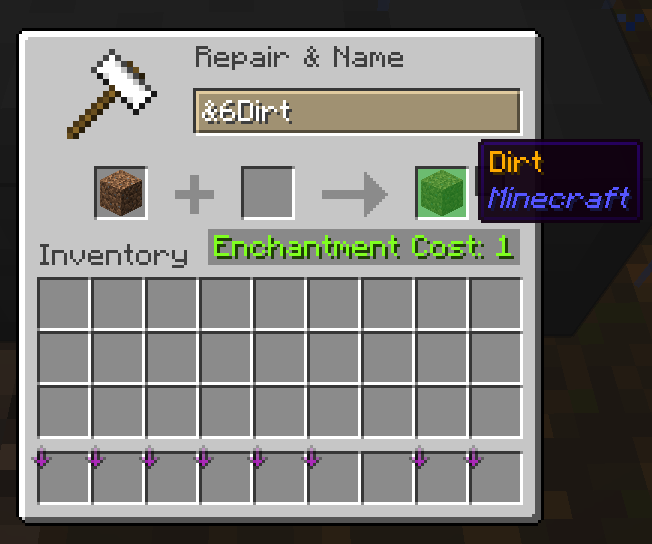
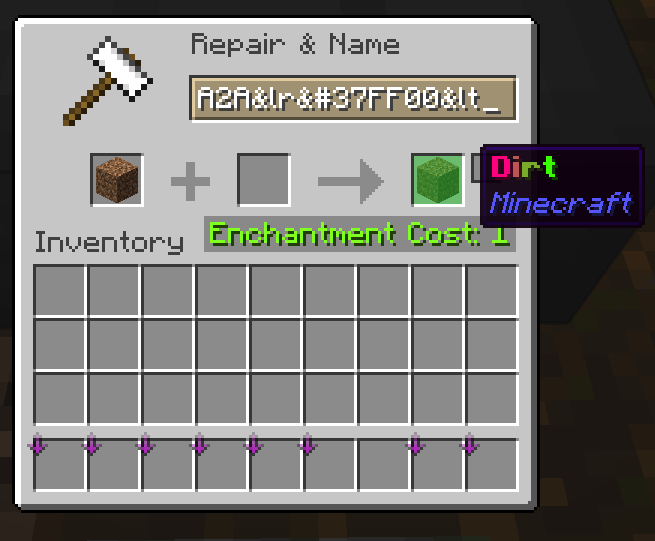
All players can enter colour codes when naming items or name tags at an anvil, or writing signs and hanging signs. Try &aLoki for green, &#ff22ccLoki for pink, or <gradient:#ff22cc:#70ff35>Loki</gradient> for a pink-to-lime gradient. RGBirdflop's &x hex format is also supported. Apply a renamed name tag to a normal mob as usual.

Normal anvil costs and sign editing protections still apply. Colours on items and signs are separate from paid player-name colours. /hat is also available to everyone.

When a subscription ends

When a subscription ends

Your limits are recalculated using your active rank and permanent perks. Existing items and builds are kept: extra Vaults become withdrawal-only, shops above the current limit pause, and excess homes can still be removed.

Earn permanent features through Reborn Journey. Open for your path and to buy eligible individual perks. Purchased permanent shop slots remain linked to your account.

Start playing

Earth, resource worlds and RTP

Build for the long term on Earth; gather replaceable materials in the reset worlds. The /rtp menu keeps both destinations one click away.

The short version

Build your permanent home on Earth and collect materials in the reset worlds.

  1. Open .
  2. Choose Earth for a home, or a resource world for a gathering trip.
  3. Check the live map when planning where to build.

Resource worlds reset daily at . Never leave a permanent base or valuables there.

Choose what you need

Key facts & screenshots
◎
Earth — permanent

The 1:500 Towny world is for towns, homes, farms and player history. Earth RTP spreads players across almost the entire playable map while keeping a safe margin inside its borders.

⟳
Resource worlds — temporary

Resource Overworld, Nether and End reset daily at . Never leave valuables or permanent builds there.

More room for resource trips

More room for resource trips

Resource dimensionBorder diameter
Overworld4,000 blocks
Nether9,000 blocks
End9,000 blocks

Each diameter has doubled, giving four times the area. Missed-reset recovery and player evacuation have been improved. Town creation, claims and outposts are blocked in all three reset worlds.

!

Claims, setting homes and creating warps are blocked in resource worlds. Resource RTP has a short warm-up; its cooldown starts only after a successful teleport.

RTP warm-up and cooldown

Stay still until the teleport completes

Moving during the resource-world warm-up cancels that request without starting its cooldown. Turning your camera alone does not cancel the warm-up.

The cooldown is recorded only after a successful teleport. Failed or cancelled requests do not spend it. Wait for the current request to finish before starting another; overlapping pending requests are blocked.

Check the message or menu for your remaining cooldown. Keep valuable builds on Earth, not in the daily reset worlds.

Build a home

Lag-safe upgradeable spawners

Spawner farms are powerful long-term projects. They do not stack, every chunk has a hard limit, and a completely upgraded spawner costs exactly $500,000.

The short version

Place a spawner, change its mob type or buy upgrades.

  1. Right-click a placed spawner to open its upgrade menu.
  2. To change the mob type, hold a spawn egg and use Shift + right-click on the spawner.
  3. To recover the spawner, mine it with a Netherite Pickaxe enchanted with vanilla Silk Touch.

The wrong tool destroys the spawner without returning its item. The limit is eight spawners per chunk.

Choose what you need

Key facts & screenshots
Chunk limit8 spawners
StackingDisabled
Full upgrade$500,000
Spawner mobsLag-safe AI
⚒

Mining requirement: use a Netherite Pickaxe enchanted with vanilla Silk Touch. Both are required to pick up a spawner. A correct break returns the spawner and uses 10 durability. Any other tool or a missing Silk Touch enchantment destroys the spawner without returning a spawner item. No custom enchantment is required.

With a valid tool, Telekinesis sends the recovered spawner into your inventory, with overflow dropped nearby. The separate Silk Spawner enchantment does not bypass the Netherite + vanilla Silk Touch requirement. Protected or cancelled breaks stay protected.

Upgrade path

Upgrade path

Right-click a placed spawner to open its menu. Each category has four paid upgrades from Level I to Level V.

Category Starts at Level V Upgrade prices Total
Spawn Range 16 blocks 32 blocks $10k · $15k · $20k · $25k $70,000
Spawn Delay 25 seconds 10 seconds $20k · $30k · $40k · $50k $140,000
Spawn Amount 4 mobs 8 mobs $50k · $65k · $80k · $95k $290,000
▦
Plan by chunk borders

The limit is eight spawners in each chunk. A farm spanning four chunks can therefore hold 32, provided each block sits in the correct chunk.

⚙
Still respect spawn rules

Upgrades improve the spawner, but mobs still need the correct space, light and environment for their type.

Change the mob type: hold a spawn egg and shift-right-click your spawner. See Thrifty and spawn eggs for how to get eggs and use them.

Build a home

CatchBall

Move supported mobs using a captured-mob item. One craft makes 3 separate CatchBalls; each ball is used for one successful capture.

The short version

Craft three balls, capture your mobs and release them where you have permission.

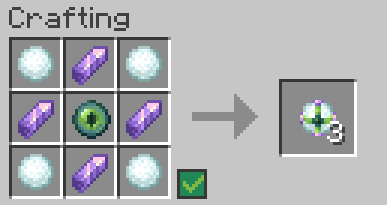
  1. Craft with 4 Snowballs, 4 Amethyst Shards and 1 Eye of Ender.
  2. Use one empty ball to capture an eligible mob. Keep its captured-mob item safe.
  3. Right-click a suitable block with that item to release the mob.

Each successful capture uses one ball. Empty balls can stack; a missed throw returns the unused ball.

Crafting recipe: Snowballs in all four corners, Amethyst Shards at the four side positions and an Eye of Ender in the centre; result: 3 CatchBalls.
The current recipe makes 3 CatchBalls. Custom CatchBall texture by Maple.
3 balls · 1 capture each

Ingredients & placement

  • 4 Snowballs — the four corners.
  • 4 Amethyst Shards — above, below, left and right of the centre.
  • 1 Eye of Ender — the centre slot.

Use a crafting table. The new custom item texture is supplied for Java and Bedrock.

Choose what you need

Craft, capture and release

Craft a CatchBall

The recipe above produces three individual single-use balls. A filled captured-mob item is what you carry and use to release the mob.

1
Capture

Hold an empty CatchBall and right-click an eligible mob, or throw the ball at it. One successful capture uses one ball.

2
Carry

Keep the captured mob's head/item in your inventory until you reach the destination. Treat it as a valuable item.

3
Release

Hold the captured-mob item and right-click a suitable block. You must have permission to release it there.

Uses, permissions and missed throws

One capture per empty ball

Empty CatchBalls can stack. Capturing a mob consumes one empty ball and gives you its transport item. A missed throw returns the unused ball.

Only supported entities can be captured. Towny and other protection rules still apply to capture and release. A CatchBall does not bypass another player's protected land. Read any denial message before trying to move a valuable animal.

If the appearance looks outdated, accept the current server resource pack and reconnect. See Java & Bedrock joining help.

Skills & adventures

PyroFishing: catches, levels and upgrades

Cast a normal fishing rod and enjoy the pond, or build your own fishing progression with custom catches, collections, bait, skills and augments.

The short version

Catch custom fish, sell catches and gradually improve your fishing setup.

  1. Bring a normal rod. No bait or Fishing Level is needed to start.
  2. Open ; use to check your Pyro Fishing Level.
  3. Find catch locations in the fish Codex, or travel to the pond with .

Bait, skills, augments and Totems are later options. You can enjoy fishing without learning them all first.

Choose what you need

Key facts & screenshots
⌁
Just want to fish?

Bring a rod. No Fishing Level, bait or upgrades are needed to start.

↑
Want to progress?

Custom catches earn Fishing XP and Entropy. Spend them on skills and rod upgrades.

★
Want a challenge?

Collect 126 species, fulfil deliveries and compete in the daily Spawn contests.

Start with a rod

Start with a rod

Find water

Use for the Spawn pond, or fish elsewhere for different habitats.

Cast and reel in a catch

Custom fish have a name and rarity. Ordinary Minecraft fish and treasure are still part of fishing.

Choose what to do with it

Sell it, keep it for a delivery or collection, or gut eligible fish for extra Entropy. opens all the fishing features.

Your Fishing Level and XP

Your Fishing Level and XP

Open and hover over the XP bottle on the left. It shows your Pyro Fishing Level, XP towards the next level and available Skill Points. The book on the right shows your catch totals and other statistics.

Catch custom fish to earn Fishing XP. Rarer catches give more XP. Each level also gives a Skill Point to spend in .

↑

This is a separate level from mcMMO Fishing. For bait, augments and Totems, check your level in /fish stats.

Custom rarities, XP and catch Entropy
In-game tier / plugin nameSpeciesBase rollFishing XPCatch Entropy
Common
Bronze
3445%5535
Uncommon
Silver
217%12090
Rare
Gold
182%260225
Epic
Diamond
150.35%600650
Legendary
Platinum
240.06%1,5002,500
Trophy
Mythical
140.01%6,0009,000

These are the configured base rolls and rewards before upgrades. Habitat, bait and other conditions affect which species you can catch; a listed chance does not guarantee a catch.

Collect fish with the Codex

Collect fish with the Codex

is your fish catalogue. Choose a rarity, then hover over a species to check where it lives and whether it needs a particular time, weather or bait. Travel to the right habitat when hunting a specific fish.

There are 126 enabled custom species across six rarities. Some menus use the plugin names Bronze, Silver, Gold, Diamond, Platinum and Mythical for the same tiers.

Find the right biome for every fish

The lists below show the exact habitats configured on Towny Reborn. Check the biome at your fishing spot, not just what the shoreline looks like. On Java, use the F3 debug screen to check nearby biome names; the small identifiers below match names such as minecraft:warm_ocean.

Any biome means there is no biome restriction for that species. Otherwise, only the listed biomes count: Ocean, Deep Ocean and Warm Ocean are separate habitats. Fish from cave biomes are still caught in water. Bait unlocks the listed species but does not remove its biome, time or weather requirements.

126 fish

Bronze · 34 fish
Tuna

Tuna

Biomes: Ocean, Deep Ocean, Beach

ocean · deep_ocean · beach

When: Day or night · Any weather
Bait: No bait required

Piranha

Piranha

Biomes: River, Plains, Forest, Meadow

river · plains · forest · meadow

When: Day or night · Any weather
Bait: No bait required

Koi

Koi

Biomes: River, Plains, Forest, Meadow

river · plains · forest · meadow

When: Day or night · Any weather
Bait: No bait required

Bass

Bass

Biomes: River, Plains, Forest, Meadow

river · plains · forest · meadow

When: Day or night · Any weather
Bait: No bait required

Random Fish

Random Fish

Biomes: Any biome

When: Day or night · Any weather
Bait: No bait required

Basic Fish

Basic Fish

Biomes: Any biome

When: Day or night · Any weather
Bait: No bait required

Bubbly Fish

Bubbly Fish

Biomes: Any biome

When: Day or night · Any weather
Bait: No bait required

Atlantic Cod

Atlantic Cod

Biomes: Ocean, Deep Ocean, Beach

ocean · deep_ocean · beach

When: Day or night · Any weather
Bait: No bait required

Shrimp

Shrimp

Biomes: Warm Ocean, Lukewarm Ocean, Beach

warm_ocean · lukewarm_ocean · beach

When: Day or night · Any weather
Bait: No bait required

Chaos Fish

Chaos Fish

Biomes: Any biome

When: Day or night · Rain required
Bait: No bait required

Angelfish

Angelfish

Biomes: Warm Ocean, Lukewarm Ocean, Beach

warm_ocean · lukewarm_ocean · beach

When: Day or night · Any weather
Bait: Reef Bait

Catfish

Catfish

Biomes: River, Plains, Forest, Meadow

river · plains · forest · meadow

When: Day or night · Any weather
Bait: River Bait

Pike

Pike

Biomes: River, Plains, Forest, Meadow

river · plains · forest · meadow

When: Day or night · Any weather
Bait: No bait required

Nuptuna

Nuptuna

Biomes: Any biome

When: Day or night · Any weather
Bait: No bait required

Red Mullet

Red Mullet

Biomes: Any biome

When: Day or night · Any weather
Bait: No bait required

Sardine

Sardine

Biomes: Any biome

When: Day or night · Any weather
Bait: No bait required

Bream

Bream

Biomes: Any biome

When: Day or night · Any weather
Bait: No bait required

Sunfish

Sunfish

Biomes: Any biome

When: Day or night · Any weather
Bait: No bait required

Squid

Squid

Biomes: Any biome

When: Day or night · Any weather
Bait: No bait required

Blackfin Tuna

Blackfin Tuna

Biomes: Ocean, Deep Ocean, Beach

ocean · deep_ocean · beach

When: Day or night · Any weather
Bait: No bait required

Glacierfish

Glacierfish

Biomes: Cold Ocean, Deep Cold Ocean, Frozen Ocean, Snowy Plains

cold_ocean · deep_cold_ocean · frozen_ocean · snowy_plains

When: Day or night · Any weather
Bait: No bait required

Slimejack

Slimejack

Biomes: Swamp, Mangrove Swamp, River

swamp · mangrove_swamp · river

When: Day or night · Any weather
Bait: No bait required

Lingcod

Lingcod

Biomes: Ocean, Deep Ocean, Beach

ocean · deep_ocean · beach

When: Day or night · Any weather
Bait: Abyss Bait

Sturgeon

Sturgeon

Biomes: River, Plains, Forest, Meadow

river · plains · forest · meadow

When: Day or night · Any weather
Bait: No bait required

Stonefish

Stonefish

Biomes: Warm Ocean, Lukewarm Ocean, Beach

warm_ocean · lukewarm_ocean · beach

When: Day or night · Any weather
Bait: No bait required

Herring

Herring

Biomes: Ocean, Deep Ocean, Beach

ocean · deep_ocean · beach

When: Day or night · Any weather
Bait: No bait required

Perch

Perch

Biomes: Any biome

When: Day or night · Any weather
Bait: No bait required

Ice Pip

Ice Pip

Biomes: Cold Ocean, Deep Cold Ocean, Frozen Ocean, Snowy Plains

cold_ocean · deep_cold_ocean · frozen_ocean · snowy_plains

When: Day or night · Any weather
Bait: No bait required

Halibut

Halibut

Biomes: Cold Ocean, Deep Cold Ocean, Frozen Ocean, Snowy Plains

cold_ocean · deep_cold_ocean · frozen_ocean · snowy_plains

When: Day or night · Any weather
Bait: No bait required

Mud Shark

Mud Shark

Biomes: Swamp, Mangrove Swamp, River

swamp · mangrove_swamp · river

When: Day or night · Any weather
Bait: No bait required

Greengill

Greengill

Biomes: Any biome

When: Day or night · Any weather
Bait: No bait required

Ordon Catfish

Ordon Catfish

Biomes: River, Plains, Forest, Meadow

river · plains · forest · meadow

When: Day or night · Any weather
Bait: No bait required

Seabass

Seabass

Biomes: Any biome

When: Day or night · Any weather
Bait: No bait required

Trogdor the Hydrogenator

Trogdor the Hydrogenator

Biomes: Any biome

When: Day or night · Rain required
Bait: No bait required

Silver · 21 fish
Eel

Eel

Biomes: Ocean, Deep Ocean, Beach

ocean · deep_ocean · beach

When: Day or night · Any weather
Bait: No bait required

Manta Ray

Manta Ray

Biomes: Ocean, Deep Ocean, Beach

ocean · deep_ocean · beach

When: Day or night · Any weather
Bait: No bait required

White Fish

White Fish

Biomes: Taiga, Old Growth Spruce Taiga, River

taiga · old_growth_spruce_taiga · river

When: Day or night · Any weather
Bait: No bait required

Mackerel

Mackerel

Biomes: Badlands, Desert, Savanna, River

badlands · desert · savanna · river

When: Day or night · Any weather
Bait: No bait required

City Fish

City Fish

Biomes: Any biome

When: Day or night · Any weather
Bait: No bait required

Nemo Fish

Nemo Fish

Biomes: Any biome

When: Day or night · Any weather
Bait: No bait required

Dory Fish

Dory Fish

Biomes: Any biome

When: Day or night · Any weather
Bait: No bait required

Marlin Fish

Marlin Fish

Biomes: Ocean, Deep Ocean, Beach

ocean · deep_ocean · beach

When: Day or night · Any weather
Bait: No bait required

Damselfish

Damselfish

Biomes: Any biome

When: Day or night · Any weather
Bait: Reef Bait

Frost Minnow

Frost Minnow

Biomes: Cold Ocean, Deep Cold Ocean, Frozen Ocean, Snowy Plains

cold_ocean · deep_cold_ocean · frozen_ocean · snowy_plains

When: Day or night · Any weather
Bait: No bait required

Hemopiranha

Hemopiranha

Biomes: River, Plains, Forest, Meadow

river · plains · forest · meadow

When: Day or night · Any weather
Bait: No bait required

Neon Tetra

Neon Tetra

Biomes: Any biome

When: Day or night · Any weather
Bait: No bait required

Red Snapper

Red Snapper

Biomes: Any biome

When: Day or night · Any weather
Bait: No bait required

Octopus

Octopus

Biomes: Ocean, Deep Ocean, Beach

ocean · deep_ocean · beach

When: Day or night · Any weather
Bait: No bait required

Tiger Trout

Tiger Trout

Biomes: River, Plains, Forest, Meadow

river · plains · forest · meadow

When: Day or night · Any weather
Bait: River Bait

Midnight Squid

Midnight Squid

Biomes: Ocean, Deep Ocean, Beach

ocean · deep_ocean · beach

When: Night only · Any weather
Bait: Abyss Bait

Prismite

Prismite

Biomes: Any biome

When: Day or night · Any weather
Bait: No bait required

Blue Jellyfish

Blue Jellyfish

Biomes: Ocean, Deep Ocean, Beach

ocean · deep_ocean · beach

When: Day or night · Any weather
Bait: No bait required

Red Jellyfish

Red Jellyfish

Biomes: Ocean, Deep Ocean, Beach

ocean · deep_ocean · beach

When: Day or night · Any weather
Bait: No bait required

Pink Jellyfish

Pink Jellyfish

Biomes: Ocean, Deep Ocean, Beach

ocean · deep_ocean · beach

When: Day or night · Any weather
Bait: No bait required

Honeyfin

Honeyfin

Biomes: Any biome

When: Day or night · Any weather
Bait: No bait required

Gold · 18 fish
Shark

Shark

Biomes: Ocean, Deep Ocean, Beach

ocean · deep_ocean · beach

When: Day or night · Any weather
Bait: No bait required

Angler Fish

Angler Fish

Biomes: Ocean, Deep Ocean, Beach

ocean · deep_ocean · beach

When: Night only · Any weather
Bait: Abyss Bait

Viper Fish

Viper Fish

Biomes: Ocean, Deep Ocean, Beach

ocean · deep_ocean · beach

When: Day or night · Any weather
Bait: No bait required

Tiger Fish

Tiger Fish

Biomes: River, Plains, Forest, Meadow

river · plains · forest · meadow

When: Day or night · Any weather
Bait: No bait required

Dinomite Fish

Dinomite Fish

Biomes: Any biome

When: Day or night · Any weather
Bait: No bait required

E-Boy Fish

E-Boy Fish

Biomes: Any biome

When: Day or night · Any weather
Bait: No bait required

Weeb Fish

Weeb Fish

Biomes: Any biome

When: Day or night · Any weather
Bait: No bait required

Ebonkoi

Ebonkoi

Biomes: River, Plains, Forest, Meadow

river · plains · forest · meadow

When: Day or night · Any weather
Bait: No bait required

Flarefin Koi

Flarefin Koi

Biomes: River, Plains, Forest, Meadow

river · plains · forest · meadow

When: Day or night · Any weather
Bait: No bait required

Mudcrab

Mudcrab

Biomes: Swamp, Mangrove Swamp, River

swamp · mangrove_swamp · river

When: Day or night · Any weather
Bait: No bait required

Colossal Catfish

Colossal Catfish

Biomes: River, Plains, Forest, Meadow

river · plains · forest · meadow

When: Day or night · Any weather
Bait: River Bait

Mooranha

Mooranha

Biomes: Any biome

When: Day or night · Any weather
Bait: No bait required

Bashful Angler

Bashful Angler

Biomes: Ocean, Deep Ocean, Beach

ocean · deep_ocean · beach

When: Night only · Any weather
Bait: No bait required

Fairy Fish

Fairy Fish

Biomes: Warm Ocean, Lukewarm Ocean, Beach

warm_ocean · lukewarm_ocean · beach

When: Day or night · Any weather
Bait: Reef Bait

Lava Eel

Lava Eel

Biomes: Badlands, Desert, Savanna, River

badlands · desert · savanna · river

When: Day or night · Any weather
Bait: Mythic Bait

Sir Reginald

Sir Reginald

Biomes: Any biome

When: Day or night · Any weather
Bait: No bait required

Screaming Goat Fish

Screaming Goat Fish

Biomes: Any biome

When: Day or night · Any weather
Bait: No bait required

Black Bean Fish

Black Bean Fish

Biomes: Any biome

When: Day or night · Any weather
Bait: No bait required

Diamond · 15 fish
Pyro Fishy

Pyro Fishy

Biomes: Any biome

When: Day or night · Any weather
Bait: No bait required

Altair

Altair

Biomes: Any biome

When: Day or night · Any weather
Bait: No bait required

Purple Fish

Purple Fish

Biomes: Any biome

When: Day or night · Any weather
Bait: No bait required

Nep Fish

Nep Fish

Biomes: Any biome

When: Day or night · Any weather
Bait: No bait required

Neeko Fish

Neeko Fish

Biomes: Any biome

When: Day or night · Any weather
Bait: No bait required

Princess Fish

Princess Fish

Biomes: Any biome

When: Day or night · Any weather
Bait: No bait required

Ancient Fish

Ancient Fish

Biomes: Lush Caves, Dripstone Caves, River

lush_caves · dripstone_caves · river

When: Day or night · Any weather
Bait: River Bait

Grand Swordfish

Grand Swordfish

Biomes: Lush Caves, Dripstone Caves, River

lush_caves · dripstone_caves · river

When: Day or night · Any weather
Bait: No bait required

Great Fairy Fish

Great Fairy Fish

Biomes: Warm Ocean, Lukewarm Ocean, Beach

warm_ocean · lukewarm_ocean · beach

When: Day or night · Any weather
Bait: No bait required

Savage Shark

Savage Shark

Biomes: Ocean, Deep Ocean, Beach

ocean · deep_ocean · beach

When: Day or night · Any weather
Bait: No bait required

Ghostfish

Ghostfish

Biomes: Lush Caves, Dripstone Caves, River

lush_caves · dripstone_caves · river

When: Night only · Any weather
Bait: Abyss Bait

Void Salmon

Void Salmon

Biomes: Lush Caves, Dripstone Caves, River

lush_caves · dripstone_caves · river

When: Night only · Any weather
Bait: Mythic Bait

Tiny Kitten

Tiny Kitten

Biomes: Any biome

When: Day or night · Any weather
Bait: No bait required

Faye Fish

Faye Fish

Biomes: Any biome

When: Day or night · Any weather
Bait: No bait required

ZedFish

ZedFish

Biomes: Any biome

When: Day or night · Any weather
Bait: No bait required

Platinum · 24 fish
Man o' War

Man o' War

Biomes: Swamp, Mangrove Swamp, River

swamp · mangrove_swamp · river

When: Day or night · Rain required
Bait: No bait required

Rainbow Trout

Rainbow Trout

Biomes: Warm Ocean, Lukewarm Ocean, Beach

warm_ocean · lukewarm_ocean · beach

When: Day or night · Any weather
Bait: Reef Bait

Rouge Fish

Rouge Fish

Biomes: Any biome

When: Day or night · Any weather
Bait: No bait required

Skylar Fish

Skylar Fish

Biomes: Any biome

When: Day or night · Any weather
Bait: No bait required

Berry Fishy

Berry Fishy

Biomes: Any biome

When: Day or night · Any weather
Bait: No bait required

Tanya the Evil

Tanya the Evil

Biomes: Any biome

When: Day or night · Any weather
Bait: No bait required

Tohka Fish

Tohka Fish

Biomes: Any biome

When: Day or night · Any weather
Bait: No bait required

Galaxy Rasbora

Galaxy Rasbora

Biomes: Warm Ocean, Lukewarm Ocean, Beach

warm_ocean · lukewarm_ocean · beach

When: Night only · Any weather
Bait: Mythic Bait

Unicorn Fish

Unicorn Fish

Biomes: Any biome

When: Day or night · Any weather
Bait: No bait required

The Yeehaw

The Yeehaw

Biomes: Any biome

When: Day or night · Any weather
Bait: No bait required

Strawberry Tiger Barb

Strawberry Tiger Barb

Biomes: Any biome

When: Day or night · Any weather
Bait: No bait required

Iridescent Shark

Iridescent Shark

Biomes: Ocean, Deep Ocean, Beach

ocean · deep_ocean · beach

When: Day or night · Any weather
Bait: No bait required

Colossal Squid

Colossal Squid

Biomes: Ocean, Deep Ocean, Beach

ocean · deep_ocean · beach

When: Day or night · Any weather
Bait: Abyss Bait

Devils Hole Pupfish

Devils Hole Pupfish

Biomes: Lush Caves, Dripstone Caves, River

lush_caves · dripstone_caves · river

When: Day or night · Any weather
Bait: No bait required

Great White Shark

Great White Shark

Biomes: Ocean, Deep Ocean, Beach

ocean · deep_ocean · beach

When: Day or night · Any weather
Bait: No bait required

Death Manta

Death Manta

Biomes: Ocean, Deep Ocean, Beach

ocean · deep_ocean · beach

When: Night only · Any weather
Bait: No bait required

Kiwi Fish

Kiwi Fish

Biomes: Any biome

When: Day or night · Any weather
Bait: No bait required

Glazula

Glazula

Biomes: Cold Ocean, Deep Cold Ocean, Frozen Ocean, Snowy Plains

cold_ocean · deep_cold_ocean · frozen_ocean · snowy_plains

When: Day or night · Any weather
Bait: No bait required

Ariel, the Mermaid

Ariel, the Mermaid

Biomes: Any biome

When: Day or night · Any weather
Bait: No bait required

Siren

Siren

Biomes: Jungle, River, Warm Ocean

jungle · river · warm_ocean

When: Night only · Any weather
Bait: No bait required

Elmo

Elmo

Biomes: Any biome

When: Day or night · Any weather
Bait: No bait required

Trichloromethane

Trichloromethane

Biomes: Badlands, Desert, Savanna, River

badlands · desert · savanna · river

When: Day or night · Any weather
Bait: No bait required

Chlorofish

Chlorofish

Biomes: Lush Caves, Dripstone Caves, River

lush_caves · dripstone_caves · river

When: Day or night · Any weather
Bait: No bait required

Small Hill Fish

Small Hill Fish

Biomes: Any biome

When: Day or night · Any weather
Bait: No bait required

Mythical · 14 fish
Ayanami Fish

Ayanami Fish

Biomes: Badlands, Desert, Savanna, River

badlands · desert · savanna · river

When: Day or night · Any weather
Bait: No bait required

Shimakaze Fish

Shimakaze Fish

Biomes: Lush Caves, Dripstone Caves, River

lush_caves · dripstone_caves · river

When: Day or night · Any weather
Bait: No bait required

Kurumi Fish

Kurumi Fish

Biomes: Ocean, Deep Ocean, Beach

ocean · deep_ocean · beach

When: Day or night · Any weather
Bait: No bait required

Zero Two Fish

Zero Two Fish

Biomes: River, Plains, Forest, Meadow

river · plains · forest · meadow

When: Day or night · Any weather
Bait: No bait required

Natsumi Fish

Natsumi Fish

Biomes: Warm Ocean, Lukewarm Ocean, Beach

warm_ocean · lukewarm_ocean · beach

When: Day or night · Any weather
Bait: No bait required

Shinoa Fish

Shinoa Fish

Biomes: Cold Ocean, Deep Cold Ocean, Frozen Ocean, Snowy Plains

cold_ocean · deep_cold_ocean · frozen_ocean · snowy_plains

When: Day or night · Any weather
Bait: No bait required

Inori Fish

Inori Fish

Biomes: Swamp, Mangrove Swamp, River

swamp · mangrove_swamp · river

When: Day or night · Any weather
Bait: No bait required

Hibiki Fish

Hibiki Fish

Biomes: Jungle, River, Warm Ocean

jungle · river · warm_ocean

When: Day or night · Any weather
Bait: No bait required

Xayah Fish

Xayah Fish

Biomes: Taiga, Old Growth Spruce Taiga, River

taiga · old_growth_spruce_taiga · river

When: Day or night · Any weather
Bait: No bait required

Ryuko Fish

Ryuko Fish

Biomes: Badlands, Desert, Savanna, River

badlands · desert · savanna · river

When: Day or night · Any weather
Bait: No bait required

Amaterasu Fish

Amaterasu Fish

Biomes: Lush Caves, Dripstone Caves, River

lush_caves · dripstone_caves · river

When: Day or night · Any weather
Bait: Mythic Bait

Ichigo Fish

Ichigo Fish

Biomes: Ocean, Deep Ocean, Beach

ocean · deep_ocean · beach

When: Day or night · Any weather
Bait: No bait required

Kotori Fish

Kotori Fish

Biomes: River, Plains, Forest, Meadow

river · plains · forest · meadow

When: Day or night · Any weather
Bait: No bait required

Nami Fish

Nami Fish

Biomes: Warm Ocean, Lukewarm Ocean, Beach

warm_ocean · lukewarm_ocean · beach

When: Day or night · Any weather
Bait: Mythic Bait

See the fish codex
Bait: optional fish for your collection

Bait: optional fish for your collection

Buy bait in . Hover over the bait to see its level requirement. Once bought, drag the bait onto a fishing rod in your inventory to apply it.

BaitPyro levelPriceUsesBait-only species
River Bait5$1,5005004
Reef Bait15$3,5007504
Abyss Bait30$7,5001,0005
Mythic Bait45$15,0002,0005

Bait gives access to specific collector fish. You can keep catching other custom fish without it. It is not a general bonus to every fish’s catch chance. Check the Codex for the bait-only species and their habitats.

How to use bait

  1. Check your Pyro Fishing level with . This is separate from mcMMO and Minecraft XP.
  2. Buy the bait in /fish bait. You need the required level, enough money and inventory space.
  3. In your inventory, drag the bait onto your fishing rod. Only one bait can be attached to a rod at a time; keep separate rods for different bait types.
  4. Fish in the correct biome and, for night-only species, at night. Check the rod tooltip for remaining uses and replace exhausted bait.

Bait unlocks the species listed below; it does not guarantee that your next catch will be one of them. Normal custom fishing still works without bait. Use /fish codex to check a target species before travelling.

River Bait · Level 5 · $1,500 · 500 uses
  • Catfish (Bronze)
    River, Plains, Forest, Meadow · Day or night
  • Tiger Trout (Silver)
    River, Plains, Forest, Meadow · Day or night
  • Colossal Catfish (Gold)
    River, Plains, Forest, Meadow · Day or night
  • Ancient Fish (Diamond)
    Lush Caves, Dripstone Caves, River · Day or night
Reef Bait · Level 15 · $3,500 · 750 uses
  • Angelfish (Bronze)
    Warm Ocean, Lukewarm Ocean, Beach · Day or night
  • Damselfish (Silver)
    Any biome · Day or night
  • Fairy Fish (Gold)
    Warm Ocean, Lukewarm Ocean, Beach · Day or night
  • Rainbow Trout (Platinum)
    Warm Ocean, Lukewarm Ocean, Beach · Day or night
Abyss Bait · Level 30 · $7,500 · 1,000 uses
  • Lingcod (Bronze)
    Ocean, Deep Ocean, Beach · Day or night
  • Midnight Squid (Silver)
    Ocean, Deep Ocean, Beach · Night only
  • Angler Fish (Gold)
    Ocean, Deep Ocean, Beach · Night only
  • Ghostfish (Diamond)
    Lush Caves, Dripstone Caves, River · Night only
  • Colossal Squid (Platinum)
    Ocean, Deep Ocean, Beach · Day or night
Mythic Bait · Level 45 · $15,000 · 2,000 uses
  • Lava Eel (Gold)
    Badlands, Desert, Savanna, River · Day or night
  • Void Salmon (Diamond)
    Lush Caves, Dripstone Caves, River · Night only
  • Galaxy Rasbora (Platinum)
    Warm Ocean, Lukewarm Ocean, Beach · Night only
  • Amaterasu Fish (Mythical)
    Lush Caves, Dripstone Caves, River · Day or night
  • Nami Fish (Mythical)
    Warm Ocean, Lukewarm Ocean, Beach · Day or night
?

No bait-only fish yet? Check the rod’s bait and remaining uses, the exact biome and the time. “Ocean” is not automatically “Warm Ocean”. Lava Eel is a fish caught in water despite its name. Crab Bait, the fishing augment, is a separate rod upgrade for crab catches; it is not one of these four consumable baits.

Money, weighing and Entropy

Money, weighing and Entropy

$
Money goes into your balance

Use it for towns, shops and other server purchases.

✦
Entropy upgrades your fishing

Earn it from custom catches, gutting, deliveries and contests. Check it with .

Sell your fish

Open , put the fish you want to sell into the empty slots, then close the menu. Those fish are sold. Save anything you still need for a delivery or Totem first.

Fish tierBase sale priceEntropy from gutting
Ordinary fish$5—
Common (Bronze)$1225
Uncommon (Silver)$3070
Rare (Gold)$70160
Epic (Diamond)$175450
Legendary (Platinum)$4501,400
Trophy (Mythical)$1,200Not guttable

Fish-shop sales have a $12,000 limit per 24-hour reset period. The featured fish receives a 25% sale bonus; check the shop for the current species. Augments and weighing can also change a fish’s value.

Weighing is a gamble

In , add fish, select a risk and click the anvil. Their sale value can go up or down. A whole stack in one slot gets the same weighing result; use separate slots for separate rolls.

RiskChance to profitChange to base sale price
Low Risk70%Up to ±10%
Medium Risk60%Up to ±20%
High Risk50%Up to ±35%
Extreme Risk40%Up to ±50%

Weighed fish do not receive the featured-fish shop bonus.

Gut fish for Entropy

In , add eligible custom fish and use the gutting control. They are consumed in exchange for the Entropy shown above. Trophy / Mythical fish cannot be gutted. Gutting cannot be undone, and you cannot sell or deliver those fish afterwards.

See the weighing and gutting menus
Trade Entropy with other players

Trade Entropy with other players

Sell your own PyroFishing Entropy to another player for in-game money. You agree the amount and price together; the buyer confirms the offer before anything is transferred.

$

The price is the total for the entire offer. For example, offers 10,000 Entropy for $5,000 in total. This is an example, not a fixed server exchange rate. The trade handles payment when accepted, so the buyer should not send a separate /pay payment.

1. The seller sends an offer

Use . Both players must be online and have the required Entropy or money. Use a positive whole number for Entropy and a positive money amount, with a decimal point if needed, such as 5000.25. Each player can take part in one pending offer at a time.

2. The buyer accepts or declines

The buyer receives [ACCEPT] and [DECLINE] buttons in chat. Click one, or use or . The seller name is optional when responding to your incoming offer.

3. Both receive a confirmation

On acceptance, the buyer pays the agreed total and receives the Entropy. The seller receives that money and gives up the same amount of Entropy. There is no additional trade fee. Both players see a receipt in chat.

These screenshots show a small test offer: 1 Entropy for $1.00 total. Choose your own amount and agreed price when trading.

⌛
60 seconds to respond

An offer expires after 60 seconds. Either player can use to cancel it. Logging out also cancels a pending offer.

✓
Balances are checked again

Sending an offer does not reserve or deduct either balance. If either player spends too much before acceptance, the trade cannot complete. Repeated clicks on a completed offer do not transfer anything again.

Check your Entropy with or . Entropy sales are player-to-player; this feature does not add a server shop or use withdrawable crystals.

Why can I not send or accept an offer?

Check that both players are online, neither has another pending offer, and the seller has enough Entropy while the buyer has enough money. Wait around 10 seconds after joining if fishing data is still loading. Expired, declined and cancelled offers must be sent again. If the game asks for staff review, contact staff before making any separate payment.

Spend your Skill Points

Spend your Skill Points

opens your fishing skills. Hover over an item to see your current effect, the next upgrade and its cost. Upgradable skills use Skill Points earned from your Fishing Level.

SkillWhat it helps with
Better GuttingMore Entropy when you gut fish.
Luck of the CatchMore Entropy when you catch fish.
Master AugmenterLower Entropy cost when crafting augments.
Totem LeaderShorter Totem cooldown as you catch fish.
See the skill tooltips
One-time skills for a longer grind

These are unlocked once with Skill Points, then improve as your Fishing Level increases. The menu shows the current unlock cost.

One-time skillEffect
Divine JudgementChance to create a fishing area that can give extra catches.
Tribal ShoutShares part of your Totem’s benefits with nearby fishers.
Combo CatcherBuilds a catch combo that improves rare-fish chances. A long pause breaks the combo.
Augment InfusionChance to refund some materials used when crafting an augment.
Augments: build a better fishing rod

Augments: build a better fishing rod

lists the augments, recipes, Fishing Levels and Entropy costs. opens the menu where you apply them to a rod. Augments with an “s” is the catalogue; augment without it is the workbench.

Check a recipe

Hover over an augment in /fish augments. Meet its Pyro level and gather both the ingredients and Entropy.

Craft it in a cauldron

Drop the recipe items into a cauldron, then hit the cauldron with a fishing rod.

Apply it to your rod

Open /fish augment. Put the rod and augment in their marked slots and use the green confirmation button.

Crafting and applying more copies of the same augment increases its level, up to that augment’s maximum. Sage helps your Pyro Fishing XP; Intellect affects ordinary Minecraft XP.

See the augment catalogue
All configured craftable augments: levels, costs and effects
AugmentPyro levelBase Entropy costMax levelWhat it does
Hot Spot1050,00013Chance of extra fish when it is not raining.
Saturate1235,0005Chance to restore hunger while fishing.
Call Of The Storm1540,0005Chance of extra fish while it is raining.
Sage1857,50010More Pyro Fishing XP.
Biome Disruption2560,0003Chance to bypass a fish’s biome requirement; other requirements still apply.
Precision Cutting2870,0008More Entropy from gutting fish.
Intellect3050,00010More ordinary Minecraft XP.
Crab Bait3540,0005Higher chance to reel in a crab.
Perception4075,0007More Entropy from custom catches.
Trophy4560,0006Better chance to profit when weighing fish.
Solar Rage5075,0005More money from selling fish.
Master Fisherman60120,00020Improves the chance of higher-tier fish.

Costs are per crafted copy, before skill discounts. Crab Crusher is also shown in the catalogue: it helps with crab combat and special crab loot. Follow its in-game tooltip for availability.

Ingredients for every craftable augment
AugmentIngredients for one copy
Hot Spot16× Glistering Melon Slice; 32× String; 3× Golden Apple; 1× Oak Boat; 4× Dolphin Tail
Saturate16× Cooked Beef; 1× Cake; 12× Baked Potato; 16× Cod
Call Of The Storm1× Water Bucket; 1× Oak Boat; 16× Cod; 4× Lily Pad; 4× Sponge
Sage8× Gold Block; 16× Crab Scale; 16× Crab Claw; 3× Dolphin Tail; 4× Gunpowder; 16× Redstone; 16× Sugar
Biome Disruption16× Oak Log; 16× Snowball; 32× Sand; 32× Kelp; 1× Water Bucket; 12× Dolphin Tail; 20× Crab Scale
Precision Cutting1× Anvil; 1× Diamond Sword; 1× Iron Axe; 16× Cobblestone; 2× Emerald; 3× Lapis Block; 1× Water Bucket; 1× Wither Skeleton Skull; 6× Nautilus Shell
Intellect20× Lapis Block; 8× Book; 8× Diamond; 8× Emerald Block; 16× Crab Scale
Crab Bait1× Water Bucket; 10× Crab Claw; 20× Crab Scale; 64× String
Perception32× Glass; 4× Glowstone; 3× Turtle Egg; 3× Nautilus Shell; 10× Crab Claw
Trophy32× Iron Block; 16× Gold Block; 12× Diamond Block; 12× Emerald Block; 16× Squid Tentacle; 1× Heart Of The Sea
Solar Rage8× Gold Block; 5× Diamond Block; 12× Emerald Block; 10× Crab Claw; 10× Crab Scale; 10× Squid Tentacle
Master Fisherman1× Nether Star; 8× Ghast Tear; 16× Crab Claw; 16× Crab Scale; 8× Dolphin Tail; 12× Squid Tentacle; 2× Heart Of The Sea
Where do the special crafting materials come from?

Reeling in a crab has a configured base chance of 4%. Crab Claws and Crab Scales come from killing these crabs. Dolphin Tails come from dolphins, and Squid Tentacles come from squid. Deliveries can also reward these materials.

MaterialSourceConfigured base drop chance
Crab ClawFishing crabs45%
Crab ScaleFishing crabs40%
Dolphin TailDolphins20%
Squid TentacleSquid15%

Looting can improve these drops. Dolphins and squid spawned by spawners can also drop Dolphin Tails and Squid Tentacles. Kill dolphins for a 20% base chance of a Dolphin Tail, or normal squid for a 15% base chance of a Squid Tentacle. These items are also available from Fishing Delivery rewards. This spawner allowance applies to Pyro crafting drops; Thrifty spawn eggs still exclude spawner mobs.

Can I remove augments from my rod?

Open /fish augment, put the rod in its slot and read the removal control before clicking. Removing the augments costs 25,000 Entropy and returns them to your inventory. Leave enough inventory space.

Deliveries: give saved fish a purpose

Deliveries: give saved fish a purpose

You earn a new delivery after 100 custom catches at the base setting. The Lucky Charm upgrade reduces that requirement. Open and hover over a delivery to see the exact fish, rewards and timer.

Gather every requested fish

Keep useful catches or trade with other players. The order needs all its fish before you can start it.

Start the delivery

Click the order once you have its fish. They are handed in and consumed.

Wait, then claim the reward

Return when the timer finishes and click the order to collect your reward. Leave inventory space for items.

Rewards include Entropy, crafting materials, Entropy Crystals and lures, depending on the order. An empty deliveries menu means you currently have no orders.

See the delivery menu
Delivery upgrades
UpgradeWhat it changes
Increase CapacityMore delivery slots.
OverclockedShorter delivery timers.
Expert DelivererFewer fish needed for normal orders.
Pay RiseMore Entropy from completed orders.
Lucky CharmFewer custom catches needed to earn your next order.

Hover over the upgrades along the bottom to see their current price and effect.

Lures, boosters and Entropy Crystals

Delivery rewards can include Platinum, Mythical and Crab Lures. Their item tooltips explain the effect and how to activate them. shows your active boosters and remaining time.

Entropy Crystals can be redeemed by right-clicking them in the air. Creating crystals by withdrawing your own Entropy is disabled on Towny Reborn.

Fishing Totems: a later progression goal

Fishing Totems: a later progression goal

At Pyro Fishing Level 20, you can activate your own Totem. Build the Totem structure shown in the official recipe ↗, then right-click the bottom observer with a fishing rod.

Activation requirementAmount
Pyro Fishing Level20
Legendary / Platinum fish6 of any species
Crab Claws16
Crab Scales16
Dolphin Tails16
Squid Tentacles16

You can own one Totem. Its menu controls activation, cooldown, duration, radius and passive effects. Upgrades cost Entropy. Passive slots determine how many effects you can enable.

⌖

Stand inside your active Totem’s area to receive its effects. Casting the fishing line outside the area is fine. A Totem on cooldown gives no passive benefits.

Totem passive unlocks
PassivePyro levelSlots usedBenefit
Experienced Fisherman2011.25× Fishing XP
Little Critters402Improves crab-material drops in the Totem area.
Fish Schools403Helps Hot Spot and Call of the Storm trigger more often.
Random Drops554Crabs can drop other fishing materials.
Treasure Hunter603Chance to find extra fishing loot.
Mythical Waters605Chance to upgrade a catch to a higher rarity.
Entropy Hoarder6061.20× catch Entropy

Enable or disable passives in the Totem menu. You need both the required Fishing Level and enough available passive slots.

Keep fish and fish with friends

Keep fish and fish with friends

gives you space to store catches you want to keep. Its delivery toggle allows orders to check the bag as well as your inventory. Store requested fish before selling a batch.

Party Fishing is enabled: fish near other players for the group bonus, with up to four nearby fishers contributing within 32 blocks. Each player still casts their own rod.

See the fish bag
Daily contests at the Spawn pond

Daily contests at the Spawn pond

Start times · UTC00 · 04 · 08 · 12 · 16 · 20
Each round10 minutes
Minimum online2 players

Six rounds run daily, every four hours. Use before the round starts. Only catches inside the Spawn Fishing region count. Catch a fish during the round to participate; no separate sign-up is needed. The pond’s live board and chat updates show your progress.

shows the time until the next contest. explains the different objectives. Follow the challenge announced for that round.

What can a contest ask you to do?
ChallengeGoal
Longest CatchCatch the longest fish.
Shortest CatchCatch the shortest fish.
Most CatchesCatch the most fish.
Target FishCatch the announced species.
Total LengthBuild the largest combined fish length.
Base Entropy EarnedEarn the most base catch Entropy.
Longest CastMake the longest successful fishing cast.

Contest rewards

FinishMoneyEntropy
1st$1,5005,000
2nd$7502,500
3rd$4001,000
Other participants—250

Winners receive their place reward. Other participating fishers receive 250 Entropy.

Quick answers

Quick answers

Why do I still catch ordinary fish?

Custom fish are chance-based. Ordinary fish and Minecraft fishing treasure are still enabled. Specific custom species may also require a different biome, bait, weather or time; check /fish codex.

Why can I not buy bait yet?

Check /fish stats, then compare your Pyro Fishing Level with the bait requirement. You also need enough money. mcMMO Fishing levels do not unlock Pyro bait.

Where is the XP bottle?

Open /fish stats and hover over the left-hand XP bottle. In /fish menu, the “Your Level & Skills” bottle opens your skills.

Should I sell or gut a fish?

Sell it when you want money. Gut it when you want more Entropy for fishing upgrades. First check whether you need the fish for a delivery, bait collection or Totem. A sold or gutted fish is gone.

Why does my contest score not change?

Make sure a contest is running, you are inside the Spawn Fishing region, and your catches match the active challenge. Travel there with /warp fishing.

Fishing quests & Journey Points

Fishing quests & Journey Points

The latest expansion adds 162 PyroFishing quests: 126 species objectives, 24 rarity-mastery continuations and 12 three-species collections. Open and inspect the fishing categories for targets, habitat hints and rewards.

Quest objectives do not progress at Spawn; fish in other eligible worlds when working on quests. Buying fish or collecting old items does not count as a new catch. Each actual quest completion gives 20 JP, up to 160 quest JP per UTC day.

The separate fishing Journey source gives 5 JP per rod catch, up to 150 JP / 30 catches per UTC day. Neither of these caps stops normal Fishing XP or other fishing rewards. Read the Journey source guide.

Skills & adventures

PyroMining: ores, artifacts & upgrades

Turn a mining trip into its own adventure with discoveries, upgrade currencies, powerful encounters and one-time Journey rewards.

The short version

Earn separate mining XP and discover extra rewards while mining ores.

  1. Open to see your PyroMining menu.
  2. Mine eligible ores with a pickaxe without Silk Touch.
  3. Use the reward and artifact guides below when you find something new.

PyroMining has its own level. Mining mobs are restricted to resource worlds; player-placed ores can also give PyroMining rewards.

Choose what you need

Key facts & screenshots
Start here/mine
Quest expeditions75 quests
One-time Journey rewards2,500 JP
Start with a pickaxe

Start with a pickaxe

Open the Mining menu

Use to find the shop, statistics, Journal, artifacts, Vessels and Singularity upgrades. lists the player commands.

Choose your world

Mine in Earth, Earth Nether, Earth End or the Resource Overworld, Nether and End. Spawn, AFK and the Dragon arena do not award mining rewards. Resource worlds reset daily; keep permanent builds on Earth.

Mine eligible ore normally

Use a pickaxe without Silk Touch for normal mining rewards. Your tool, the ore and any required upgrade determine which rolls are available. Creative, Spectator and protected or cancelled breaks do not count.

Deep caves in the Towny Reborn resource world
Explore renewable resource caves while keeping permanent Earth builds intact.
Understand your rewards

Understand your rewards

Mining XP & level

Eligible ore awards PyroMining XP. Check for your mining progress. This is separate from mcMMO Mining and Jobs levels.

Zeta

Zeta is PyroMining’s upgrade currency. Earn it through eligible mining and use the Mining menus to inspect upgrades and their costs. It is separate from dollars, fishing Entropy and Journey Points.

Flux

Basic Flux has a 2% base chance on its configured ores and sells for $50. Blazed Flux has a 2% base chance on its configured Nether ore and sells for $75. Open for the mining shop.

Gemstones

Each configured gem tier has a 1% base chance. Ore determines its tier; quality changes its sale value. Inspect the item and shop before deciding whether to sell it.

Gem tierConfigured ore familyBase value
1Coal$100
2Redstone$150
3Nether Quartz$250
4Lapis$400
5Emerald$600
6Diamond$900

Gem values above are the tier bases. Quality uses the configured multipliers: Ruined 0.7×, Badly Damaged 0.8×, Damaged 0.9×, Worn 1.2× and Pristine 1.5×. A reward chance is a roll, not a guaranteed drop from every block.

Artifacts, Vessels & your Journal

Artifacts, Vessels & your Journal

Find sealed artifacts while mining eligible ores. Open to inspect identification slots and timers. Check the item’s tier, available actions and displayed requirements before identifying, upgrading or selling it.

The Journal explains mining systems and your Journey milestones. Vessels provide pickaxe upgrades; inspect their lore for activation and level requirements. Stronger Vessel Haste can work alongside career effects without being downgraded by a weaker refresh. The Singularity menu contains further mining progression and upgrade costs.

Artifact tiers: identification times & configured values

The configured base artifact discovery chance is 0.8% on eligible mining actions. Sealed artifacts can be opened for a random artifact of their rarity; inspect the actual item and identification screen for its requirements. Base identification times and tier values are:

Artifact tierBase identification timeConfigured value
Basic20 minutes$100
Unusual40 minutes$160
Epic60 minutes$300
Exceptional90 minutes$500
Legendary120 minutes$800
Fabled160 minutes$1,200
Mythic200 minutes$1,700
Celestial240 minutes$2,300
Divine280 minutes$3,000

Upgrades and the item’s state can affect the actions available. Read the item and confirmation screen before committing it to a slot or selling it.

Player-placed ores give full PyroMining rewards

Player-placed ores give full PyroMining rewards

Player-placed ores can award all normal PyroMining rewards: XP, Flux, gems, artifacts, Zeta, Vessel bonuses and mining mob triggers. Previously tracked and piston-moved ores are included. The usual chances, tool, enchantment, level and world requirements still apply.

!

Custom mining mobs remain restricted to resource worlds. Earth mining does not spawn them. This PyroMining rule does not change Jobs or mcMMO placed-block accounting, or the server’s automation rules.

Rune Guardians, Oracles & mining quests

Rune Guardians, Oracles & mining quests

Follow the Journal and item tooltips for Rune Guardian, Oracle and advanced mining requirements. Use summoning items in the resource worlds. Towny and WorldGuard protections continue to apply.

Open and choose PyroMining for 75 one-time quests covering discoveries, artifacts, bosses and ore expeditions. Actual discoveries count; buying an old artifact or picking up somebody else’s mining item does not count as discovering it. Spawn, Creative, Spectator and cancelled actions do not count.

One-time mining Journey rewards

One-time mining Journey rewards

AchievementOne-time JP
PyroMining level 10100 JP
PyroMining level 20200 JP
PyroMining level 30300 JP
PyroMining level 40500 JP
PyroMining level 50750 JP
First identified artifact50 JP
First Rune Guardian100 JP
First Oracle500 JP

These eight rewards total 2,500 JP, outside daily activity caps. Existing qualifying achievements count. Rewards are credited through the Journey integration; relogging or restarting does not pay an already claimed milestone again.

Events & extras

The Ancient Dragon Event

A full server boss fight in a fresh disposable arena: scalable difficulty, five lives, personal statistics, damage rankings and a dramatic victory sequence.

The short version

Fight the event dragon with other players and earn rewards.

  1. Events run at 05:00 and 17:00 UTC.
  2. When registration opens, use .
  3. Bring combat equipment. The lobby opens five minutes before the fight.

You have five lives. Leaving an active fight forfeits rewards; read the event rules before joining.

Choose what you need

Key facts & screenshots
◷

Two events every day: 05:00 and 17:00 UTC.

RegistrationUp to 3h early
Fight limit20 minutes
Lives5 per fighter
Base health500 effective HP
Register

When the announcement appears, use /dragon join. You can register from the first three-hour announcement onward.

Enter the lobby

The arena opens five minutes before the event. Registered players are teleported into a fresh copy of the custom End arena.

Survive the summoning

The crystals awaken, the exit seals and all participants are forced into Survival without flight. Bring your own combat equipment.

Fight together

The boss gains 250 effective HP and 5% attack power per additional fighter, up to configured caps. Larger groups can also trigger extra projectiles.

Claim your result

Deal at least 25 damage to qualify. Rankings, crystals destroyed, explosions and personal bests are recorded after a victory.

❤

Death rules: inventory is kept inside the event, you respawn immediately with brief protection and Slow Falling, and after the fifth death you become a spectator without rewards. Leaving the active arena also forfeits rewards.

Victory rewards

Victory rewards

Result Reward Rule
#1 damage $5,000 Exclusive rank prize
#2 damage $3,000 Exclusive rank prize
#3 damage $2,000 Exclusive rank prize
Participation $500 For eligible non-ranked fighters
No deaths +$500 For eligible non-ranked fighters
Damage tier $250–$1,000 Highest reached tier only

Top-three prizes replace participation, no-death and damage-tier rewards. Late participation receives $250 instead of the standard $500.

What counts as a Dragon Champion win?

Champion wins mean first place by damage

The Dragon Champion leaderboard counts the fighter who finishes #1 by damage in a won event. Taking part or placing second/third is not a Champion win; participation is tracked separately.

New results are dated for Today, Week, Month and Year rankings. Older totals without a reliable date remain in All Time. See leaderboard periods and statistics.

Events & extras

Leaderboards & time periods

Compare recorded player statistics using the controls on the in-game leaderboard holograms.

The short version

Choose the statistic and time period you want to compare.

  1. Find an in-game leaderboard hologram and use its period controls.
  2. Choose Today, Week, Month, Year or All Time where that statistic supports periods.
  3. Read the statistic label: a current total, a dated event count and a highest ping are different measurements.

Leaderboard calendar boundaries use Europe/Berlin; weeks start on Monday. Journey daily JP budgets reset separately at 00:00 UTC.

Choose what you need

Why can All Time differ from recent periods?

Recorded periods and older totals

All Time can contain older totals that have no reliable date. Those records are kept in All Time rather than guessed into Today, Week, Month or Year. Recent periods therefore do not always equal the lifetime total, even if you started playing recently.

An empty period should show no recorded entries, not a stale value from an earlier period. Period views are provided for supported statistics; a current-state value is not automatically a historical counter.

Ping, auctions, Jobs and Dragon wins

Know what the board measures

StatisticMeaning
Highest network pingThe highest recorded proxy-to-player ping for the selected period, not a sum or an average. An older undated peak is not treated as today's peak.
Auction HouseMoney spent and items bought follow the selected time period.
Current Job XP / total Job levelSeparate boards: XP within current Job levels is not the same as the sum of those levels.
Dragon Champion winsFirst place by damage in a won Dragon Event. Participation and other placements are separate.

If a figure still looks wrong after an update, send staff a screenshot showing the statistic name, selected period and player name.

Events & extras

Crates, voting and the Vote Piñata

Keys are virtual, rewards are previewable and every valid vote helps the entire server reach the next Piñata Party.

The short version

Use earned virtual keys to open crates and receive rewards.

  1. Use to browse the crate menu.
  2. Check the crate's required key and possible rewards before opening it.
  3. Use to earn voting rewards and help trigger the Vote Piñata.

Make room in your inventory before opening a crate. Different crates use different keys.

Choose what you need

Key facts & screenshots
!

Make inventory space before opening. A full storage inventory blocks the opening before keys or other costs are taken. For multiple openings, keep at least one completely empty storage slot per selected crate; armour and offhand slots do not count. Previews remain available.

D
Daily Crate

Small everyday supplies and cash rewards.

V
Vote Crate

One virtual Vote Key for every valid server vote.

C
Cosmetic Crate

Permanent cosmetic unlocks; duplicate rewards are skipped.

S
Supporter Crate

One virtual key every 24 hours while an eligible rank is active.

Vote

Open the Vote page, choose a voting site and enter your exact Minecraft username.

Open your key

Use /crates or visit /warp crates. Left-click previews rewards; right-click opens the selected crate.

Fill the global meter

At 50 votes, a Vote Piñata appears at Spawn. Use /voteparty to join.

Hit it for rewards

Each player can hit the Piñata and win cash, resources or keys. The final hit has its own larger prize pool.

Skills & adventures

mcMMO skills

Level your skills by playing, then use their bonuses while gathering, crafting and fighting.

The short version

mcMMO improves skills such as Mining and Herbalism while you play.

  1. Open to inspect a skill.
  2. Do the matching activity to earn skill XP. Your power level is the sum of your mcMMO skill levels.
  3. Read the skill's tooltip before using its active ability; tool abilities start with a right-click.

Your mcMMO level, Job levels, Journey level and Pyro Fishing/Mining levels are different systems.

Choose what you need

Check your levels

Check your levels

Open and choose a skill to see its level, XP towards the next level and abilities. shows your skill totals; opens the leaderboards. Your power level is the total of your skill levels.

What you doSkill progressExamples of bonuses
Mine, dig and cut treesMining, Excavation, WoodcuttingExtra drops and active tool abilities.
Harvest crops and plantsHerbalismExtra harvests and crop replanting.
Fight with weapons or trained wolvesThe matching combat skill or TamingWeapon bonuses and combat abilities.
Brew, repair and fishAlchemy, Repair, FishingBonuses for those activities.
Passive bonuses and active abilities

Passive bonuses and active abilities

Passive bonuses work during matching actions. Active abilities are temporary and have a cooldown. For tool abilities, right-click with the matching tool to prepare it, then use it on the matching blocks.

Super Breaker

A Mining ability used with a pickaxe. Open for your current bonuses.

Giga Drill Breaker

An Excavation ability used with a shovel. Check it with .

Tree Feller

A Woodcutting ability used with an axe to fell connected tree blocks. Check it with .

Keep your tools in good condition and read the ability tooltip for its effect and duration. The green global booster doubles eligible mcMMO XP.

↑

These levels are separate: Jobs levels belong to your professions; mcMMO levels belong to your skills. Bait and other Pyro Fishing unlocks use your Pyro Fishing Level in . Check the exact skill or profession named by your next objective. PyroMining also has its own separate level; open the mining guide.

Skills & adventures

Custom enchantments

Find new effects for your gear and read exactly what they do in the item tooltip.

The short version

Add extra effects to your equipment and check exactly how each enchantment works.

  1. Browse enchantments with .
  2. Read its item requirements and where to find it, then use an anvil to apply a compatible book.
  3. Looking for spawn eggs? Open the Thrifty guide.

A spawn egg changes your spawner with Shift + right-click. Picking up a spawner requires a Netherite Pickaxe with vanilla Silk Touch.

Choose what you need

Find, understand and combine enchantments

Find, understand and combine enchantments

Custom enchantments add new effects to your equipment. Use to browse them in game, and hover over your item to read its effects.

Eligible enchantments can appear at an enchanting table, in librarian book trades and in generated loot. Treasure enchantments skip the table. Special reward enchantments have their normal acquisition pools disabled; the catalogue labels these separately. Villager offers are random, and an already established trade does not automatically change.

Use an anvil to apply a compatible book or combine equipment. An item can have at most three custom enchantments. The item type, maximum level, vanilla restrictions and listed conflicts still matter. Enchantments do not use a rechargeable-charge system here.

Thrifty: get spawn eggs and change your spawner
✦

Thrifty: get spawn eggs and change your spawner

Thrifty I–III is a sword enchantment. Defeat an eligible naturally spawned mob with the sword for a small chance of its spawn egg: I 0.25% · II 0.50% · III 0.75%. It is treasure-only: look for an eligible librarian book trade or generated loot, then use an anvil.

  1. Get the spawn egg of the mob you want.
  2. Hold the egg, hold Shift and right-click your spawner, aiming at the spawner block.
  3. The egg is consumed and the spawner changes to that mob type. For example, a Zombie Spawn Egg makes it a Zombie Spawner.

You need permission to use the spawner at that location. An egg changes the mob type; it is not a range, speed or spawn-amount upgrade.

No egg farm loop: mobs from normal or trial spawners, breeding, buckets, commands, eggs and other non-natural spawn sources do not count. MythicMobs, the Wither, Ender Dragon and Warden are excluded. A mob must have a usable spawn egg.

Picking up a spawner block: mine it with a Netherite Pickaxe enchanted with vanilla Silk Touch. Both the tool and Silk Touch are required. Thrifty gives spawn eggs, not spawner blocks; its eggs let you change the mob type of a spawner you already have. See spawner upgrades and pickup rules.

17 custom enchantments on Towny Reborn

17 custom enchantments on Towny Reborn

Search by name, effect or equipment. Levels and availability below follow Towny Reborn’s configuration. Effects described as “can” are chance-based; higher levels may improve their strength, duration or chance. The item tooltip shows the values for your particular item.

17 enchantments

Weapons · 4

Bane of Netherspawn Max 5

Deals extra damage to Nether mobs.

Use on: Swords & axes
Find: Enchanting table · Librarian trades · Generated loot
Table items: Sword

Decapitator Max 2

Can drop a defeated player’s or mob’s head. Withers, Wither Skeletons, the Ender Dragon and MythicMobs are excluded.

Use on: Swords & axes
Find: Librarian trades · Generated loot

Thrifty Max 3

Can drop the defeated mob’s spawn egg. Only eligible naturally spawned mobs count; see the spawner guide above.

Use on: Sword
Find: Librarian trades · Generated loot

Village Defender Max 5

Deals extra damage to pillagers and other eligible illagers.

Use on: Swords & axes
Find: Enchanting table · Librarian trades · Generated loot
Table items: Sword

Bows & crossbows · 1

Sniper Max 2

Makes bow or crossbow projectiles travel faster.

Use on: Bow & crossbow
Find: Enchanting table · Librarian trades · Generated loot

Tools & mining · 4

Glass Breaker Max 1

Breaks glass instantly with the enchanted tool.

Use on: Tools
Find: Enchanting table · Librarian trades · Generated loot
Table items: Mining tools

Replanter Max 1

Replants crops when harvesting or right-clicking them with the hoe.

Use on: Hoe
Find: Enchanting table · Librarian trades · Generated loot

Smelter Max 1

Can automatically smelt eligible block drops. It is disabled while sneaking and does not smelt cobblestone here.

Use on: Tools
Find: Enchanting table · Librarian trades · Generated loot
Table items: Mining tools
Conflicts: Silk Touch

Telekinesis Max 1

Sends mined block drops straight into your inventory.

Use on: Tools
Find: Librarian trades · Generated loot

Armour & movement · 5

Elemental Protection Max 2

Reduces incoming potion and elemental damage.

Use on: Leggings
Find: Special items / rewards; outside the normal table, trade and loot pools

Hardened Max 1

Has a chance to briefly give you Resistance when you take damage.

Use on: Chestplate & elytra
Find: Special items / rewards; outside the normal table, trade and loot pools

Lightweight Max 1

Lets you step or jump on farmland, turtle eggs and big dripleaf safely.

Use on: Boots
Find: Enchanting table · Librarian trades · Generated loot

Night Vision Max 1

Gives Night Vision while the helmet is worn.

Use on: Helmet
Find: Librarian trades · Generated loot

Water Breathing Max 1

Gives Water Breathing while the helmet is worn.

Use on: Helmet
Find: Librarian trades · Generated loot

Fishing rods · 3

River Master Max 3

Increases fishing-hook casting speed and reach. Normal hook-distance limits still apply.

Use on: Fishing rod
Find: Special items / rewards; outside the normal table, trade and loot pools

Seasoned Angler Max 2

Increases Minecraft XP from fishing. This is separate from Pyro Fishing levels.

Use on: Fishing rod
Find: Special items / rewards; outside the normal table, trade and loot pools

Survivalist Max 1

Cooks raw fish caught with the rod automatically.

Use on: Fishing rod
Find: Librarian trades · Generated loot

Events & extras

Art, chat items and item frames

Paint your own artwork, show items in chat and decorate your storage.

The short version

Paint artwork, share an item in chat or customise item frames.

  1. Open for painting recipes and tools.
  2. While painting, save with .
  3. Type [i] or [item] in chat to show your held item.

The item-frame controls and painting screenshots are in the detailed sections below.

Choose what you need

ArtMap: paint your own artwork

ArtMap: paint your own artwork

Open for the Art Studio. Its in-game menus explain the recipes, dyes and painting tools. Make an easel and canvas, paint at the easel, then save your finished work with .

Art Studio, colours and recipes
Show an item in chat

Show an item in chat

Hold the item you want to show and type or in your message. The tag becomes an item link other players can hover over to inspect.

↗

Example: Look what I found! [item]
These are chat tags: send them as part of a message.

Invisible item frames

Invisible item frames

Look at the item frame you want to change, then use:

Show or hide the frame
Toggle a coloured glowReplace <color> with a colour, for example green.
Change several frames with right-click

Change several frames with right-click

Enable , then right-click each frame you want to show or hide. Run the same command again to leave toggle mode.

For several glowing frames, use instead.

⌂

Label your storage: an invisible frame lets the displayed item stay visible while making the chest behind it easier to open.

Events & extras

Text colors & gradients

Color your signs, item names and nametags. Supporters with name-color access can also style their nickname.

The short version

Use Minecraft colour codes or a gradient on supported text.

  1. Choose a colour code or create a gradient with Birdflop RGB.
  2. Select Birdflop's RGB format, then copy the result.
  3. Follow the matching instructions below for signs, anvils, nicknames or pet names.

Coloured nicknames require an eligible rank or Journey unlock. Signs and item naming have their own controls.

Choose what you need

Key facts & screenshots
Minecraft colors
CodeColor
&0■ Black
&1■ Dark blue
&2■ Dark green
&3■ Dark aqua
&4■ Dark red
&5■ Dark purple
&6■ Gold
&7■ Gray
&8■ Dark gray
&9■ Blue
&a■ Green
&b■ Aqua
&c■ Red
&d■ Light purple
&e■ Yellow
&f■ White
Formatting codes
CodeStyle
&lBold
&oItalic
&nUnderline
&mStrikethrough
&kObfuscated text
&rReset colors and formatting

Example: &a&lGreen text. Put the color before the formatting code; a new legacy color can reset formatting.

For a custom RGB color, use &#ff22ccText or the RGB format &x&f&f&2&2&c&cText.

Signs, items & nametags — available to everyone

Enter the codes directly in the sign editor or in an anvil's rename field. No /sign command is required. Normal build protections and anvil costs still apply.

Rename a nametag in an anvil, then use it on the mob as usual.

Gradients are supported. A compact anvil/sign example is <gradient:#ff22cc:#70ff35>Reborn</gradient>. Sign lines and anvil input have length limits; generated per-letter RGB codes can be too long.

Nickname colors — Dragon & Wither

Use /nickname to set your nickname. For generated gradients, use Birdflop's RGB output format &#rrggbb and paste the result after /nickname .

Example: /nickname &#ff22ccReborn sets a pink name. Nickname color access remains a paid rank feature; free sign/anvil colors do not unlock it.

Create a gradient with RGBirdflop

Open RGBirdflop — Create your gradient ↗

Free gradient generator. Choose &#rrggbb under Output, then copy your colored text.

  1. Open Birdflop's RGB Gradient Creator.
  2. Enter your text and select your start/end colors. Keep the color space on rgb.
  3. Under Output, choose &#rrggbb. This is the RGB code format to copy; the color-space setting alone does not choose the output syntax.
  4. For nicknames, set Prefix/Suffix to /nickname $t, or add /nickname yourself before the copied output.
  5. For sign or anvil text, copy only the colored text. If it exceeds the input limit, use a shorter name or the compact gradient example above.
Enter a color code before each sign line.
After saving, the sign displays the selected colors.
Anvil example: &6Dirt creates a gold item name.
Anvil example: a generated RGB gradient creates a multicolored item name.
Birdflop: choose the &#rrggbb output format shown here.
Events & extras

Pets & cosmetics

Choose a companion, give it a name and personalise your appearance.

The short version

Personalise your character or unlock a cosmetic companion.

  1. Left-click a display pet to open its purchase menu; right-click to see its interaction.
  2. Choose the in-game $75,000 price or its Store option.
  3. Use for the separate cosmetics menu.

Display-pet purchases and UltraCosmetics unlocks are separate. Read the guide below for your pet's controls and coloured nickname.

Choose what you need

Key facts & screenshots
MCPets: animated model pets

The detailed model pets displayed on shop pedestals use MCPets. Unlock them through their pet shop, then summon your owned companion from the MCPets menu.

UltraCosmetics: cosmetic effects & pets

Open for available categories and unlocks. Its pets and other cosmetics belong to this menu and remain separate from the MCPets pedestal shop.

Buy an MCPets companion

Buy an MCPets companion

  1. Find the pet’s 3D model on its pedestal and read its hologram.
  2. Right-click the display pet to see its interaction animation and hear its configured sounds.
  3. Left-click to open the purchase menu.
  4. Choose 75,000 in-game money and confirm payment, or choose the €10.99 store option to follow the pet’s Tebex link. Check the menu and store checkout for that offer’s current price.

A purchase permanently unlocks that pet for your account. It is an unlock, not a consumable item you have to buy every time you summon it. Use the same Minecraft account at checkout. If store delivery has not arrived, keep your receipt and contact staff rather than buying it again.

Use and name your own pet

Use and name your own pet

Open , select an unlocked pet and use its summon control. The menu also contains the pet’s available actions; mounting, skins or inventory depend on the individual pet.

  • Right-click your own summoned pet: play its native interaction.
  • Shift + right-click: open the naming dialog. Use Save name to apply your name, MCPets menu for the native actions, or Cancel.
  • Rename in the MCPets menu: opens the same naming dialog. You can rename your own pet, not another player’s pet or a shop display.

Names support colour formatting and RGB gradients. Paste the Minecraft-formatted output from RGBirdflop into the name field, rather than its website URL. Examples: &aBuddy, &#ff80c0Buddy or <gradient:#ff80c0:#b980ff>Buddy</gradient>. Save the name to preview the result. Normal name-length and content limits still apply.

Unlock and equip cosmetics

Unlock and equip cosmetics

  1. Open /cosmetics and choose a category.
  2. Read the item tooltip: it shows whether you own the cosmetic and how to use it.
  3. Select an unlocked cosmetic to equip or activate it. Use the menu’s unequip or clear control when you want to remove it.

The Cosmetic Crate awards permanent cosmetic unlocks and skips duplicate rewards. Its UltraCosmetics pets stay in that reward pool; they are not added to the MCPets pedestal shop. A cosmetic unlock grants that cosmetic, not the whole catalogue.

✦

Style, not progression: cosmetic effects do not grant Jobs or mcMMO XP boosts. A locked item cannot be equipped yet. If a pet model or texture looks wrong, make sure you accepted the server resource pack and let it finish loading.

Help & commands

Graves, homes and player tools

Recover your items, return to your previous location and manage your personal storage.

The short version

Your items and XP are stored in a protected grave after an eligible death.

  1. Check the grave coordinates sent in chat.
  2. Use after respawning, or travel to those coordinates.
  3. Collect your items from the grave before its three-hour timer expires.

Further teleports can change /back's destination. If you need help, give staff your username and approximate time of death.

Choose what you need

Your grave after death

Your grave after death

✦
Protected graves

Outside Spawn, death stores your items and 100% of your XP in an owner-only grave for three hours. Coordinates are sent in chat. When the timer expires, the grave disappears and its items drop on the ground. You may have up to five active graves; if a sixth is created, the oldest drops its contents.

⌂
Homes by rank

Member 5 · Skeleton 8 · Creeper 12 · Blaze 16 · Dragon 22 · Wither 30. Use /sethome <name> and /home <name>.

Need help finding a grave? Staff can look up active graves for online or offline owners and inspect their stored contents. Give staff your username and the approximate time of death; the staff view does not let them withdraw your items.

Return with /back

Return with /back

After respawning, use to return to your death location and recover your items from the grave. You can also follow the coordinates sent in chat.

After a normal teleport, returns you to where you were before it. Further teleports can change that saved destination. The command moves you back; items must still be collected from the grave.

Vaults, marriage and cosmetics

Player Vaults: open one of your personal storage vaults with /pv <number>. The number of available vaults depends on your rank.

Marriage: players can propose and marry without a priest. It is a social feature only and grants no Jobs or mcMMO XP multiplier.

Pets & cosmetics: see the companion and cosmetics guide for pet purchases, interactions, naming and cosmetic unlocks.

Name color and glow: eligible ranks can use the server's color and glow menus without changing gameplay.

Opening and collecting your grave safely

Collect before the timer expires

Follow the coordinates in chat and right-click your grave head to open its inventory. The grave may be placed at a nearby safe position, so use the coordinates rather than only the exact block where you died.

Your stored equipment includes armour and offhand items. If your inventory is full, items that do not fit stay in the grave; make space and collect them before the timer ends. Item withdrawal and XP collection have protection against repeated payouts.

The grave head and its supporting block are protected against creeper, TNT, wither and ghast explosions while the grave exists. This does not extend its three-hour lifetime. Once an expired or oldest-limit grave drops its contents, those items are ordinary ground drops and can be lost.

Deaths in excluded locations or events that already keep your inventory follow their own rules. If a death leaves unexpected ground drops or an empty grave, report your username, location and time to staff.

Help & commands

Sleeping and the AFK Zone

Take a break without holding up the night for everyone else.

The short version

Understand how sleeping and inactivity work on the server.

  1. Sleep in a bed when you want to help skip the night.
  2. Follow the server's AFK rules when leaving your game unattended.
  3. Read the details below for storms, phantoms and the AFK Zone.

Macros, bots and systems designed to bypass AFK detection are prohibited.

Choose what you need

Key facts & screenshots
50%
Skip the night on Earth

Half of the active players in Earth need to sleep in beds. AFK players do not count towards the requirement. The chat message shows how many more sleepers are needed.

10m
Automatic AFK Zone

After ten minutes without activity, you are moved to the AFK world. Move to return to your previous location. After a restart or reconnect, the plugin restores your saved location.

Thunderstorms and phantoms

Thunderstorms and phantoms

You cannot use beds to skip thunderstorms. Phantoms are disabled on Earth, so staying awake does not create a phantom problem.

Build a home

Farms and server limits

Plan farms around the world resets, spawner rules and redstone limits.

The short version

Build farms that respect protection and server rules.

  1. Keep permanent farms on Earth, inside your town's claimed land.
  2. Respect chunk limits and keep farms at a reasonable size.
  3. Ask staff if a protection setting or farm behaves unexpectedly.

Do not use automation to farm Jobs or mcMMO progress. Resource worlds reset daily.

Choose what you need

Key facts & screenshots
Build permanent farms on Earth

Resource worlds reset daily at . Keep farms and valuable builds on Earth, inside land your town has claimed.

Check spawner limits

You can place up to eight spawners per chunk. Spawners do not stack. Use chunk borders when planning a farm and read the spawner upgrades section.

Spawner farms and money

Spawner mob kills do not pay Jobs money. Read your profession in /jobs browse to see the actions it pays for.

Keep redstone manageable

Very fast or dense redstone systems can be throttled by the server. Give farms an off switch, turn off unused clocks and collect loose item drops.

Something behaving unexpectedly?

Something behaving unexpectedly?

Report duplication, unusual payouts or broken farm behaviour to staff. Include the location, what you did and a screenshot so the problem can be reproduced.

Help & commands

Command reference and FAQ

Click any command to copy it. Arguments in angle brackets are required; arguments in square brackets are optional.

The short version

Find a command by what you want to do, then click it to copy.

  1. Search the command list below, for example shop, home or /seen.
  2. Replace <player>, <name> and other required arguments with your own values.
  3. Use the FAQ for common problems and questions.

[Square brackets] mark optional arguments. Some commands require the relevant unlocked feature or rank.
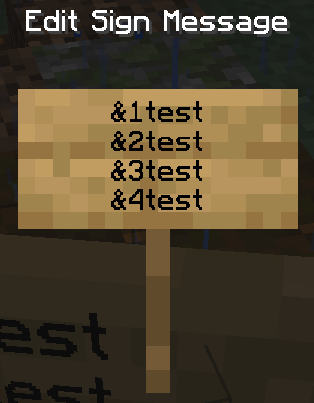
Choose what you need
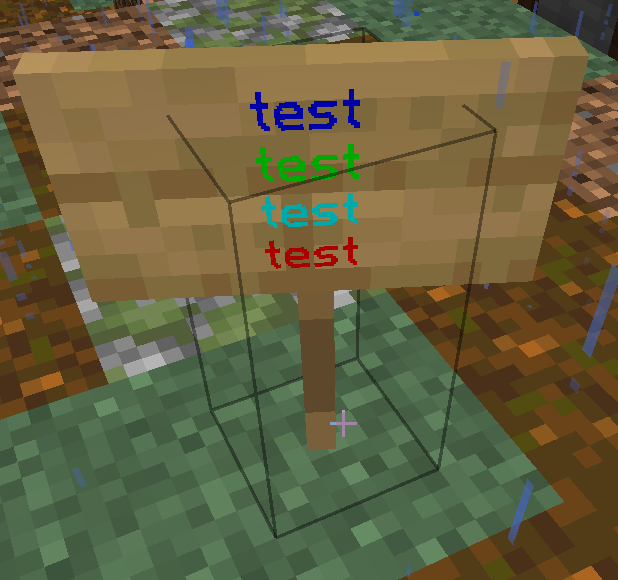
Command list
Topic Command What it does
Navigation Return to Spawn after the teleport warm-up.
Navigation Open the Earth and resource-world teleport menu.
Homes Create or update a personal home.
Homes Teleport to one of your homes.
Teleport Request to teleport to another player.
Teleport Accept or reject the pending teleport request.
TeleportReturn to your previous location after teleporting, or to your death location after respawning.
PlayersCheck when a player was last online.
Chat Send a private message; reply with /r.
Chat Switch to global chat or alliance chat.
Economy Show your personal balance.
Quests Open the quest-category menu from anywhere.
Reborn JourneyOpen your level path, JP progress, rewards and activity guide.
Permanent perksBrowse the five clickable rank heads and buy eligible individual features.
Towny Show your town board and current information.
Towny Display nearby chunks, claims and outposts.
Towny Move personal money into the town bank.
Towny Claim the current adjacent wilderness chunk.
Jobs Open the profession browser.
Shops Open the player shop directory.
ShopsCheck your current shop capacity, including permanent bonuses.
Auctions Open the global Auction House.
Fishing Open fishing progression and the fish shop.
FishingCheck your Pyro Fishing Level, XP and catch statistics.
FishingBuy bait once you meet its Pyro Fishing Level requirement.
FishingLook up custom species and their catch requirements.
FishingTravel to the Spawn contest pond.
FishingCheck the time until the next Fishing Contest.
Entropy tradingCheck your Entropy balance and show the trading help.
Entropy tradingOffer your own Entropy for the agreed TOTAL money price.
Entropy tradingAccept your incoming offer and transfer the agreed money and Entropy.
Entropy tradingDecline your incoming offer without making a payment.
Entropy tradingCancel an offer you are taking part in.
Entropy tradingCheck your PyroFishing Entropy balance.
Dragon Register for or join an announced Dragon Event.
Crates Open the virtual crate menu.
Voting Teleport to an active Vote Piñata.
Chat items Include either tag in a chat message to show the item in your hand.
Item framesShow or hide the frame you are looking at.
Item framesToggle the selected frame’s glow in the chosen colour.
Item framesToggle visibility on several frames with right-click; run again to turn the mode off.
Item framesToggle a coloured glow on several frames with right-click.
ArtMapOpen the Art Studio, recipes, tools and painting help.
ArtMapSave your artwork while painting at the easel.
EnchantsBrowse custom enchantments and their descriptions.
SkillsOpen your mcMMO skill menu.
SkillsSee your mcMMO skill levels and power level.
SkillsView the mcMMO leaderboards.
SkillsInspect your Mining skill and abilities.
SkillsInspect your Woodcutting skill and abilities.
SkillsInspect your Excavation skill and abilities.
ShopsCreate a public shop warp for $1,000.
ShopsEdit your shop warp, description, icon and access.
ShopsVisit a public shop warp.
ShopsMove your own shop warp to your current location.
AuctionsList held items at a total price for the chosen quantity.
AuctionsSearch auction listings.
AuctionsManage your listings and reclaim expired items.
AuctionsSee your auction trade history.
JobsClaim reached Job milestones and toggle qualifying career effects.
ShopsOpen the player-shop browser; search, filter and compare prices.
ShopsHold an item to find shops selling it to you: use this when you want to buy.
ShopsHold an item to find shops buying it from you: use this when you want to sell.
MiningOpen the PyroMining main menu.
MiningInspect your PyroMining level and statistics.
MiningInspect artifact identification and progression.
MiningOpen the mining shop.
ReferralsGenerate your personal invite code; all players can generate one.
ReferralsRedeem one invitation if you meet the new-player and playtime requirements.
ReferralsCheck your referral progress and reward status.
Frequently asked questions

Frequently asked questions

Can I buy or sell Entropy?

Yes, directly with other players. The seller uses and the buyer confirms in chat. Read the step-by-step Entropy guide.

How close can two different towns claim?

Leave four fully free chunks between their claim borders. The buffer also applies diagonally, to outposts and between towns in the same or allied nations. See the town spacing rule.

How do I start painting with ArtMap?

Open /art. The Art Studio contains the recipes, colour palettes and painting help.

Can I buy custom enchanted books from villagers?

Yes. Eligible custom books can appear in librarian trades. Offers are random, and some special enchantments are excluded. Treasure-only enchants are not offered at the enchanting table. See the custom enchantment catalogue for each enchantment’s availability.

Why are my mcMMO and Pyro Fishing levels different?

They are separate progression systems. Open /skills for mcMMO and /fish stats for your Pyro Fishing Level.

Does a shop warp use one of my chest-shop slots?

Public shop warps and chest shops have separate limits. A warp is a teleport destination; a chest shop trades an item.

How long do my items stay in a grave?

A grave lasts three hours. After that, it disappears and its items drop on the ground. Return using or the death coordinates sent in chat.

How do I join on Bedrock?

Add play.townyreborn.com with port 25692. Bedrock support is still in beta. Open the Bedrock instructions →

What do the Journey and perk colours mean?

Path: green is an earlier completed level, yellow your current level, red a future level. Perk menu: green is permanently purchased, blue current rank access, a chest available for purchase, red level-locked. Open the full Journey guide →

Why are NPCs or custom blocks purple and black?

The server resource pack did not load correctly. In the multiplayer list, edit Towny Reborn and set Server Resource Packs to Enabled, then reconnect. If Minecraft offers an old cached pack, close the client before trying again.

Why can I not create an outpost?

Make sure your town has an available outpost slot and at least $3,000 in its bank. Then stand in unclaimed wilderness on Earth, in the Earth Nether or in the Earth End and use /t claim outpost. Outposts have no maximum distance from your existing town land.

Can I build a base in a resource world?

You technically can place temporary blocks, but the worlds reset every day at and permanent systems such as homes and claims are blocked. Build your real base on Earth.

What happens if my town cannot pay upkeep?

If the town bank cannot cover the daily upkeep, the town immediately becomes a ruin; there is no debt or bankruptcy grace period. Its claims remain reserved for up to 48 hours, but the town is controlled by an NPC mayor, can be griefed, and most town commands and all plot commands are disabled.

After the first hour, a town resident can restore it with /t reclaim for $500. If nobody reclaims it within 48 hours, the town is permanently deleted and its claims return to wilderness. Deposit money beforehand with /t deposit <amount> to prevent this.

How many CatchBalls does one craft make?

Three separate balls, with one successful capture per ball. Use 4 Snowballs, 4 Amethyst Shards and 1 Eye of Ender. See the current recipe and picture →

Who can redeem a referral code?

A player with at least two hours of total server playtime, within their first seven days, who has not already redeemed an invitation. Anyone can generate a code. Referral rules →

Does cancelled resource RTP start a cooldown?

Moving during the warm-up cancels the request without spending its cooldown. The cooldown starts after a successful resource teleport; turning your camera alone does not cancel the warm-up.

Why is Farmer Saturation not a permanent effect icon?

It is a brief pulse every 30 seconds. Keep Farmer active, reach Job level 100 and enable the effect in /progression jobs. Job effect guide →

Why are my Today and All Time rankings different?

All Time may include older undated totals. Only properly dated records belong to recent periods. How leaderboard periods work →